- Subject
- Microsoft 365 & SharePoint
- Filed
- Source
- Antti K. Koskela
- Loans
- 914
Copilot Agents Can Take Action Through Work IQ and GitHub APIs
Declarative agents can use Microsoft 365 tools and GitHub APIs to act on live data, but scoped access, explicit confirmation and careful testing matter.

Declarative Microsoft 365 Copilot agents can do more than search and explain information: with Work IQ tools or a narrowly defined API, they can also act on live services. That gives IT teams a way to build useful workflows without running a separate agent backend. It also puts the focus on practical controls: what tools an agent can discover, which account authorizes them, and how a user confirms a consequential change.
Two examples illustrate the approach. An internal support escalation agent uses Work IQ to find people, review mail and calendars, and prepare requested communications. A separate closure agent reads and updates GitHub issues through three declared API operations. Both rely on Microsoft-hosted agent infrastructure, while the developer supplies the instructions, tool descriptions and authentication setup.
Separate knowledge from actions
A Copilot connector can provide indexed ticket information for an agent to read. That access does not, by itself, let the agent send an email, arrange a meeting or update the ticket’s underlying issue. Those capabilities come from tools. A tool may read live information as well as write changes, so connecting an action does not mean every operation it offers is a write.
The distinction matters in the GitHub example: the agent reads the current issue before deciding whether it should be closed. The live check gives it evidence beyond the indexed ticket, while the declared API defines the operations it can request. Microsoft hosts the agent and selects among its declared tools; developers configure the agent’s instructions, tool descriptions and authentication.
The sample integrations are part of a five-part series about building declarative Microsoft 365 Copilot agents. The preceding installment covered grounding an agent in support tickets using indexed sources. This step adds ways to act on what the agent finds.
Work IQ connects Microsoft 365 services
The Internal Support Escalation sample declares four Work IQ plugins, each serving a different part of the process:
- Work IQ User resolves the engineer and ticket owner to the right people.
- Work IQ Mail checks recent escalation messages and can send an escalation when requested.
- Work IQ Calendar checks meetings and can arrange an escalation meeting.
- Work IQ Teams can post a requested message to a designated channel.
The plugin manifests use a RemoteMCPServer runtime and point to a shared OAuth vault registration through MCP_DA_AUTH_ID. They describe capabilities hosted by Microsoft; they aren’t implementations of mail or calendar clients.
Setup has prerequisites. The sample calls for a Microsoft 365 Copilot license, preview access to Work IQ MCP, delegated permissions with admin consent, and tenant approval for the relevant tools. Users also complete runtime sign-in prompts. A billing policy may be needed for Work IQ in the future because it is a PAYG/UBB offering. The sample endpoints include a demo tenant ID, and its Teams instructions name a particular team and channel, so those values need to be adapted.
There’s a gap between a well-written workflow and a tightly limited tool surface. The sample describes a focused escalation process, but its Work IQ manifests use dynamic tool discovery with run_for_functions: ["*"]. The available tools may therefore be broader than the written steps. Administrators should inspect discovered tools and available restriction options before using a similar setup in production. The sample isn’t presented as a least-privilege configuration.
Instructions guide decisions; controls limit operations
The escalation instructions ask the agent to assess urgency, status, ticket age, customer impact and deadline risk, then recommend Escalate, Monitor or No escalation with an explanation. They also direct it to resolve the engineer and owner, ask when an identity is unclear, check the previous 24 hours of mail and meetings for duplicate activity, and prepare recipients and message details before a requested write.
That makes the intended process clearer, but instructions aren’t a deterministic workflow engine. They influence the agent’s choices; permissions and host controls determine which operations can actually run. In practice, teams need to observe the results and verify how the tools behave in their own tenant.
A small GitHub API limits the declared surface
The Internal Support Closure agent calls GitHub through an OpenAPI description containing three operations:
getIssueusesGETto read an issue’s current state and content.addIssueCommentusesPOSTto record a resolution note.updateIssueusesPATCHto close or reopen the issue.
The sample fixes the target repository as gautamdsheth/collabdayshelsinki2026; the agent supplies an issue_number within that repository. This removes repository selection as a source of mistakes and keeps the declared API small. A different scenario may need different boundaries, but importing a much larger API also means more operations to describe, test and manage.
The plugin manifest supplies operation descriptions, OAuth configuration and instructions for confirmation and response handling. Response cards let users inspect data returned from the service. The API specification marks reads as non-consequential and both write operations as consequential. For example, the GitHub issue API specification sets x-openai-isConsequential: true for the update operation. That flag makes confirmation part of the tool contract, rather than relying only on prose instructions.
Sign-in grants access, not standing approval
The closure sample uses a GitHub App’s user-to-server OAuth flow. The app’s permissions, its installation scope and the signed-in user’s access all affect what the agent can do. Provisioning YAML registers or updates the OAuth configuration, including its refresh URL, and writes GITHUB_AUTH_ID, which the plugin then references.
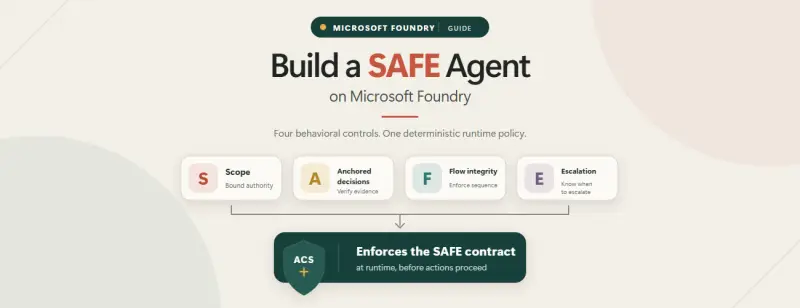
Under Microsoft’s SAFE principle, authentication establishes access but doesn’t authorize every future action without review. A consequential operation such as closing an issue still calls for explicit confirmation. Work IQ handles confirmation differently: the server’s tool definitions and the agent host determine what happens. Administrators should verify that behavior in their tenant; the GitHub OpenAPI flag is not a setting that can be added to a remotely hosted MCP server someone else controls.
Keep issue closure grounded and reviewable
The closure agent starts from the indexed ticket and its link. It extracts the issue number from that URL, not from the ticket ID, and stops if the link is missing or points to another repository. It then reads the live GitHub issue and compares its state with the indexed ticket. A resolved ticket paired with an open issue is the expected closure case; an issue that is already closed needs no second closure.
If the ticket and issue disagree, the agent should flag the mismatch. Closing an active ticket requires the user to acknowledge the mismatch and explicitly request an override. Before posting, the agent previews a resolution note grounded in the available evidence. If the ticket doesn’t record a fix, the note should say that rather than inventing a successful remediation.
Posting the comment and changing the issue state are separate confirmed operations. If the comment succeeds but the user declines the closure, the comment remains. If a request times out, check the issue before retrying a write: repeating it could create duplicate notes. The agent should report what actually happened, including the comment created and whether the issue closed.
The closure reason also needs evidence. Use completed for work that was done and not_planned for work that was dismissed or won’t be fixed. If the available information doesn’t establish which applies, the agent should ask.
A successful GitHub update doesn’t update the connector’s local JSON fixture. The live issue and indexed ticket may remain out of sync until the underlying data and index change. Teams should treat the API result as a change to GitHub, not proof that every representation of the ticket has been synchronized.
Test the whole path in stages
Start with assessment and live reads, then try one confirmed write against a disposable issue. Repeat the request and decline confirmation to check that the agent respects that choice. Verify the actual issue or message in its service; Copilot’s account of a completed action isn’t sufficient evidence by itself.
Adapt repository paths, indexed links, OAuth configuration and the Teams destination together. The sample repository contains both agents, and Microsoft documents plugins for Microsoft 365 Copilot, confirmation prompts for MCP and API plugins, and tool management for agents.
The practical takeaway is to keep the declared tool surface small, make consequential writes visible to the user, and validate each step against the live service. That gives teams a useful starting point for adding actions while keeping the agent’s access and its reported results open to inspection.


