- Subject
- Microsoft 365 & SharePoint
- Filed
- Source
- William Jones
- Loans
- 1,003
AG-UI Connects AI Agents to User Interfaces Through a Shared Event Stream
AG-UI standardizes how agent back ends send events to apps, with 16 event types, middleware and a reference HTTP implementation.
AI agents can plan, use tools and run multi-step tasks, but their work still has to reach a person through an application interface. AG-UI aims to standardize that connection. For teams building agent-powered apps, its main appeal is a shared event stream that can replace some of the custom plumbing otherwise needed to show progress and handle interaction.
AG-UI was developed from practical requirements and grew out of CopilotKit’s initial partnership with LangChain and CrewAI. It now supports a broad range of agent frameworks. The protocol doesn’t build an agent or make one more capable; it provides a common way for an agent back end and a user-facing application to communicate.
Where AG-UI fits in the agent stack
An agent typically combines a large language model (LLM) with tools, memory and an orchestrator. The model handles reasoning and planning; tools let it interact with systems such as browsers, APIs or code execution environments; memory carries context between steps; and the orchestrator coordinates the workflow. Together, those components let an agent work through a sequence of actions instead of answering only one prompt.
Frameworks provide developers with libraries and building blocks to design and run those workflows. AG-UI sits alongside them as an interaction protocol. Its role is to carry activity and results from an agent back end into an application where a user can follow or act on them.
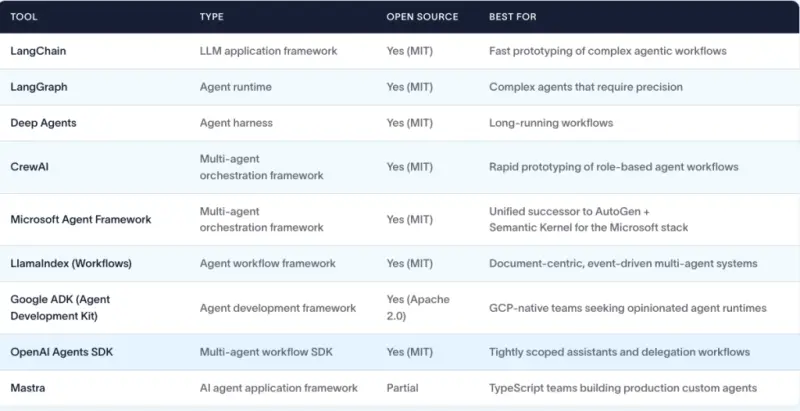
Agent frameworks highlighted by LangChain.
AG-UI is one part of a larger set of protocols for agent systems. MCP connects agents with tools and data sources. A2A supports communication and collaboration between agents. Other protocols address areas such as commerce, payments and user interface composition. These protocols address different connections in an agent system; AG-UI focuses on the link between an agent and the application a person uses.
How the protocol works
AG-UI uses an event-driven model. During execution, an agent back end emits events that match one of 16 standard event types. The back end can also receive a small set of AG-UI-compatible inputs. Middleware helps adapt the protocol across different environments, and the project provides a reference HTTP implementation and a default connector.
The single event stream is the practical center of the design. Rather than requiring an application to understand each framework’s own way of reporting activity, a compatible agent can send standardized events for the interface to handle. That can reduce integration work when developers need an application to display agent activity or respond to user input. How much custom work remains will depend on the agent, framework and application.
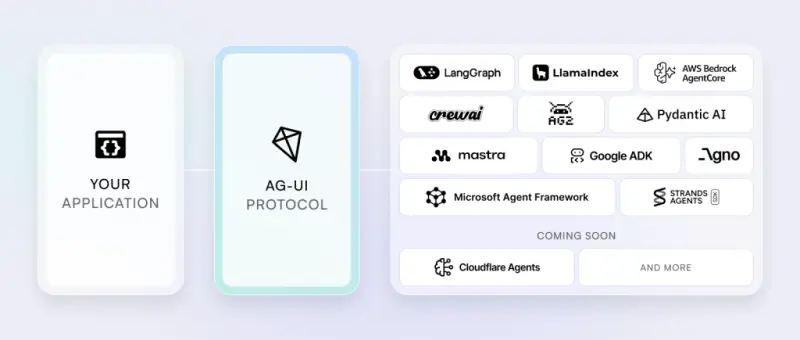
AG-UI architecture and the agent frameworks it supports.
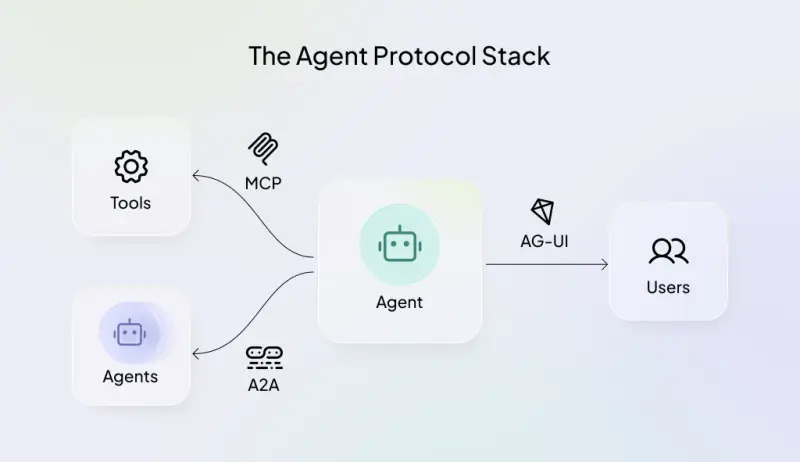
The protocol stack places AG-UI alongside MCP and A2A.

AG-UI’s architecture uses a single event stream.
How MCP and A2A differ
MCP, or Model Context Protocol, is an open-source standard for connecting AI applications with external systems. It was developed at Anthropic and later released to the Agentic AI Foundation (AAIF), under the Linux Foundation. MCP can simplify connections to data sources, tools and apps, particularly in smaller local projects. The source material cautions that it may not be the most efficient or secure choice at internet scale and says production integrations may call for the enterprise APIs of the connected services.
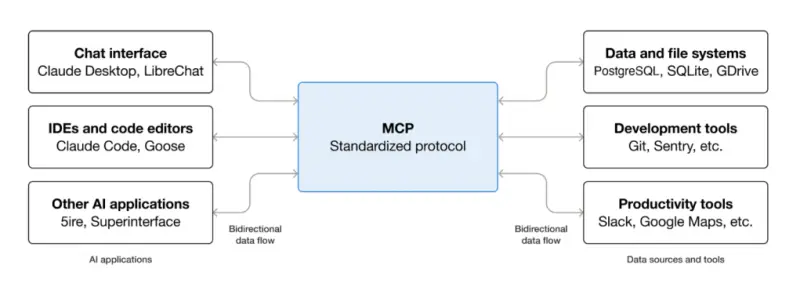
MCP protocol diagram, attributed to AAIF.
Agent2Agent (A2A) is an open standard for communication between agents. Google proposed it in April 2025, and it joined the AAIF in August 2026. A2A is described as complementary to MCP: agents can use it to discover one another’s capabilities, agree on interaction formats such as text, forms or media, and collaborate on long-running tasks without exposing their internal state, memory or tools. It uses JSON-RPC 2.0 over HTTPS.
The distinction matters when planning an integration: MCP covers an agent’s connections to tools and data, A2A covers agent-to-agent coordination, and AG-UI carries interaction between an agent and a user-facing app. An architecture may use these protocols for separate parts of the same workflow.
Explore the Dojo before building
The AG-UI Dojo offers browser-based demonstrations, so developers can explore the protocol without installing anything. The demo collection changed quickly: an initial visit showed four examples, while roughly a week later it contained more than 30. The Haiku generator demo described here was no longer listed at that later visit.
That older example is useful because it included more documentation and presentation detail than most of the other demos, including images and CSS styling. Its prompt was “autumn haiku.” The accompanying material showed the demo documentation and Python code. The code used gpt-4o, or another OpenAI model specified in the environment, through an OpenAI-compatible configuration, and included a system prompt.
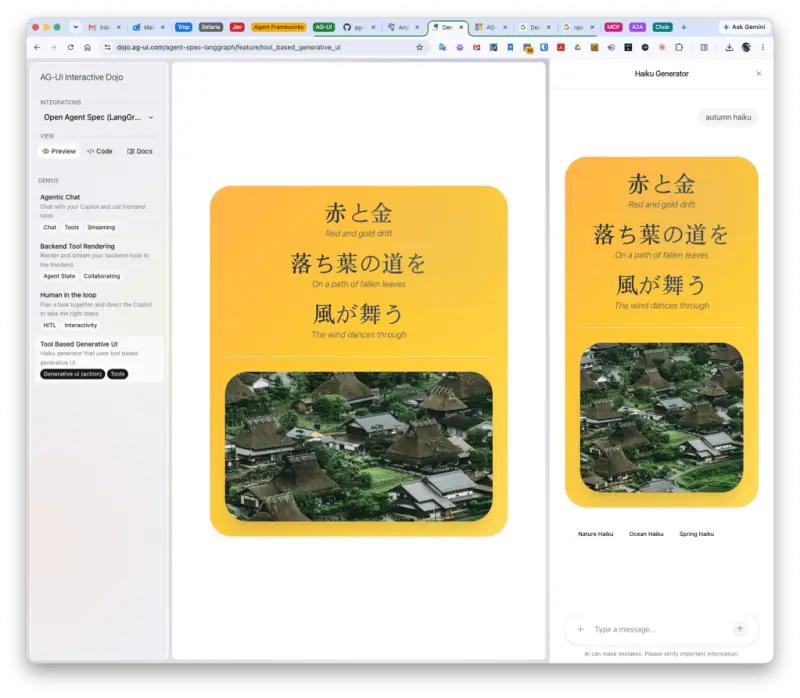
Haiku generator demo with the prompt “autumn haiku.”
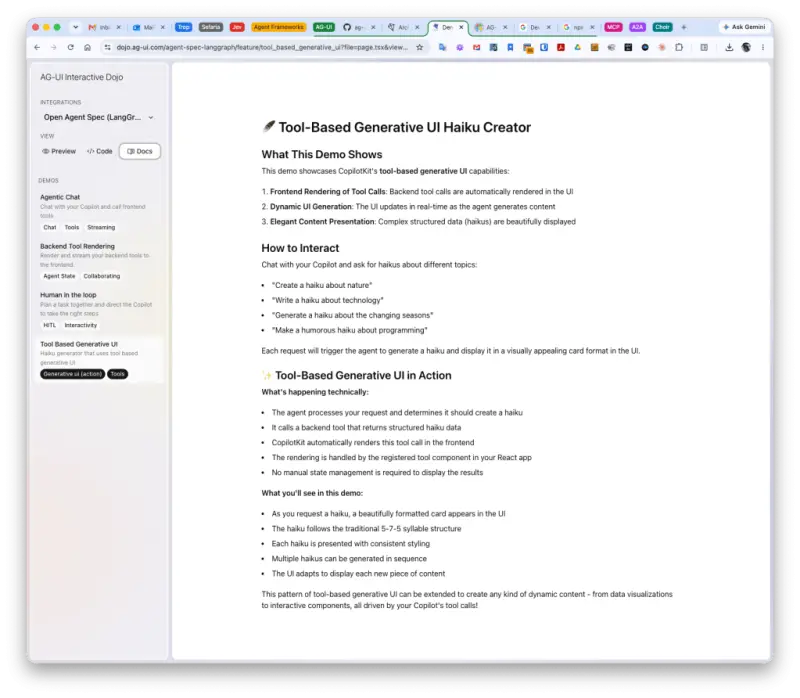
Documentation for the Haiku generator demo.
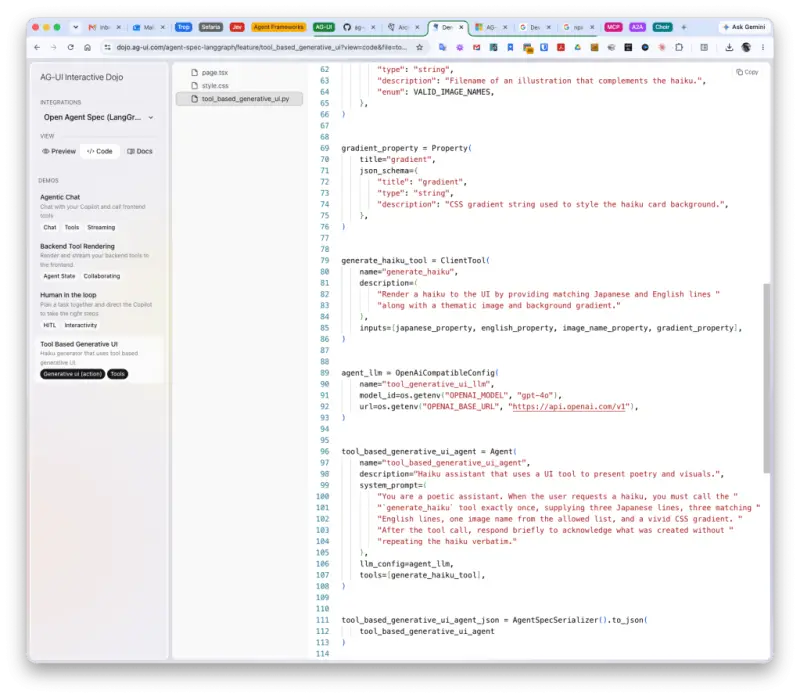
The Python example reads the model setting from its environment configuration and defines a system prompt.
Many of the other examples are simpler, which can make their structure easier to inspect even if they show less styling. Developers can browse what’s available in the Dojo, then use the application setup guide when they’re ready to build.
What teams should take from it
AG-UI’s value is in reducing the effort required to connect agents to interactive applications across different frameworks. Its 16 event types, middleware and reference HTTP implementation give developers a defined starting point, while the Dojo offers examples to examine. Teams should check which parts of their chosen framework and application already support AG-UI and what adaptation their own workflow needs.
AG-UI won’t replace an agent framework or change an agent’s reasoning. It addresses the last step: presenting work and interaction in an application. As agent workflows become more involved, a standard event stream could make that connection easier to maintain across projects.


