- Subject
- Microsoft 365 & SharePoint
- Filed
- Source
- Al Iverson
- Loans
- 315
Use Email Headers to Report Unwanted Mail to the Right Abuse Team
Gmail headers can help identify the email service provider behind unsolicited mail and give its abuse team details to investigate.

Email headers can turn an unwanted message into a useful lead for the team responsible for investigating it. They record details about the message’s route and authentication, and may point to the email service provider (ESP) that sent it for a customer. For mail you never requested and don’t recognize, that information can help you make a polite, specific complaint.
That’s more useful than sending a vague note that says only “I got spam.” An abuse team can use the original message and its headers to trace how it was sent and, where possible, identify the customer account involved. The team may not tell you what action it takes, but giving it clear evidence can reduce the effort needed to investigate.
What headers can tell you
Email headers are metadata attached to a message. Think of them as an audit trail for what happened between the sender’s system and your inbox. They can help show which systems handled the message, whether it passed authentication checks, and whether the message may be spoofed. Some headers can also identify the ESP sending mail on a customer’s behalf.
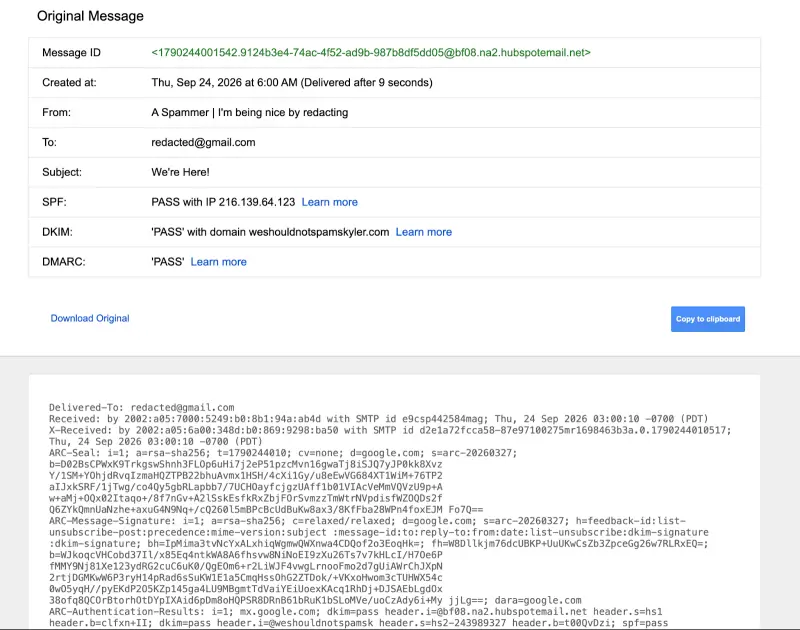
A visible sender name or address doesn’t necessarily reveal which service sent the message. Headers offer more technical detail, but they take some reading. A Message-ID can provide a clue: in the example here, its ending, hubspotemail.net, suggests a connection to HubSpot. That alone doesn’t prove HubSpot sent the message, since a sender can set the Message-ID. Treat it as a lead, then look for supporting details in the headers.
ESP abuse teams have reasons to investigate misuse. Unwanted mail can damage a service’s reputation and create extra work. The source author also points to deliverability problems and Spamhaus listings as business concerns, stating that such listings can mean 80% of a sender’s mail gets bounced. For a service provider, letting abuse continue can affect its customers as well as its own standing.
Check whether the message is truly unwanted
Use a direct abuse complaint for messages you genuinely never requested and don’t recognize. If it’s from a company you’ve bought from or otherwise engaged with, unsubscribe first. For mail you’re unsure about, use your email provider’s unsubscribe or spam reporting options. Abuse teams shouldn’t receive complaints about every message a recipient would rather not see.
The example below involves an inbox reserved for specific uses. Its owner says the sender was unfamiliar and the address wasn’t used to sign up for the message. That context helps explain why a direct complaint made sense in this case. If you write to an abuse team, describe your own circumstances accurately; don’t claim that you never signed up unless you know that’s true.
Find the headers in Gmail
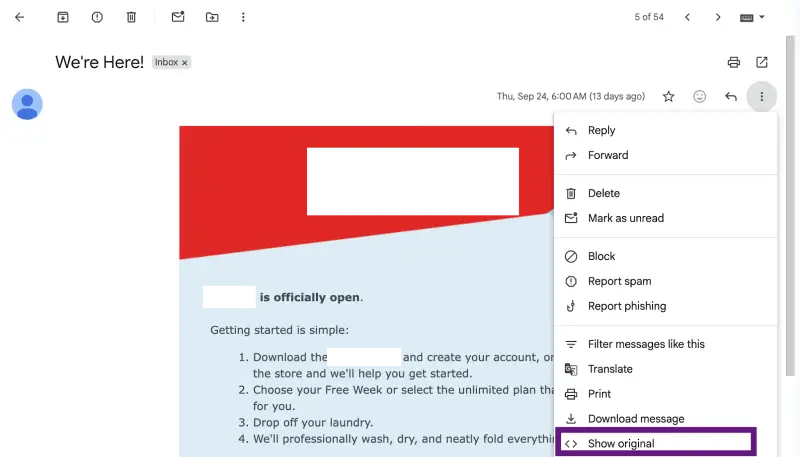
In Gmail, open the message and select the three dot menu at the upper right. Choose “Show original.” Gmail opens a page with a short message summary followed by the original headers.
Outlook users can follow Microsoft’s instructions for viewing internet message headers in Outlook. The steps differ by mail client, but the goal is the same: access the original message details rather than relying only on the sender information displayed in the inbox.
Look for the abuse contact
Headers can be long and difficult to scan. In this example, the useful field is labelled X-Report-Abuse. It identifies [email protected] as the contact for reporting the message. The Message-ID provided an early clue; this header provides a more direct route for the complaint.
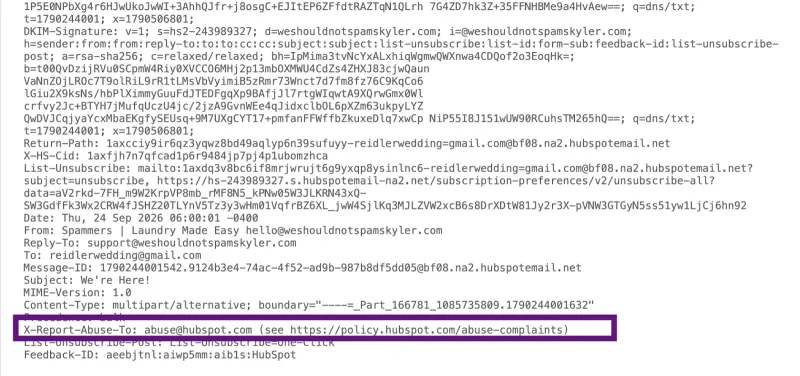
When available, an abuse contact in the headers is a practical starting point because it connects the report to the service handling the mail. Check that the address is relevant to the message before using it. A provider named in one header may not have sent the mail, and an isolated identifier shouldn’t be treated as conclusive proof.
Send enough detail to investigate
Copy the full headers using Gmail’s “Copy to clipboard” button, then forward the original message to the identified abuse contact. Include a short explanation of why you believe the message was unsolicited and any relevant details about how you use that email address. For example, you might explain that you reserve it for specific purposes and don’t recall signing up with the sender.
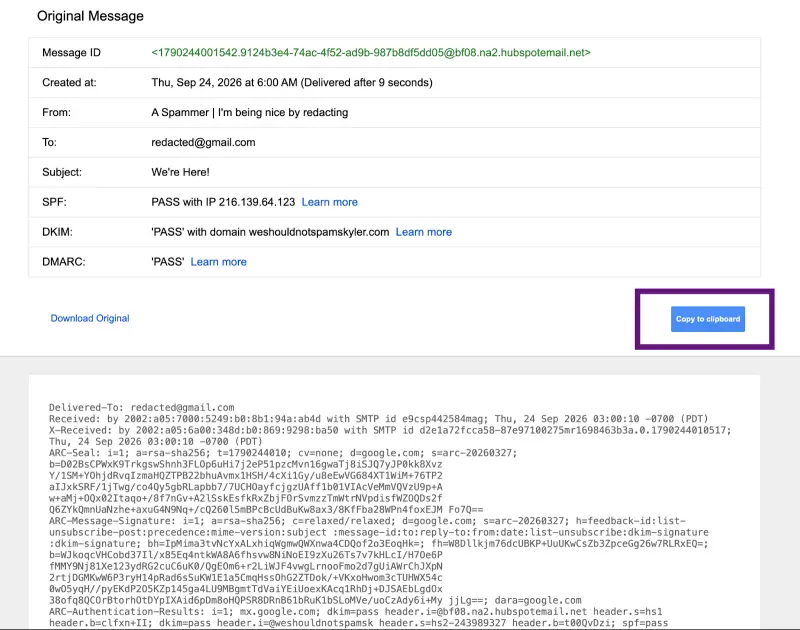
Keep the note factual and courteous. The person receiving it didn’t send the message to your inbox, and a clear description helps them assess the complaint. Headers can also help the team trace the message to the customer account that sent it, potentially avoiding follow-up questions about the message’s technical path.
Don’t expect a detailed reply. Abuse teams may send a standard acknowledgement, or may not respond at all. They generally won’t share what happens to a customer account, so a lack of follow-up doesn’t tell you whether the report was reviewed or what action followed.
For a message from a sender you’ve never heard of, headers give you a concrete next step: preserve the original, find the relevant abuse contact, and provide the evidence with a concise explanation. That leaves the investigation with the service team equipped to trace the mail.


