- Subject
- Microsoft 365 & SharePoint
- Filed
- Source
- Tony Redmond
- Loans
- 645
Microsoft to Retire Copilot Prioritize My Inbox by March 2027
Outlook will remove Copilot’s Prioritize My Inbox feature by March 2027. Microsoft 365 Copilot users should consider how they rely on it alongside Focused Inbox.
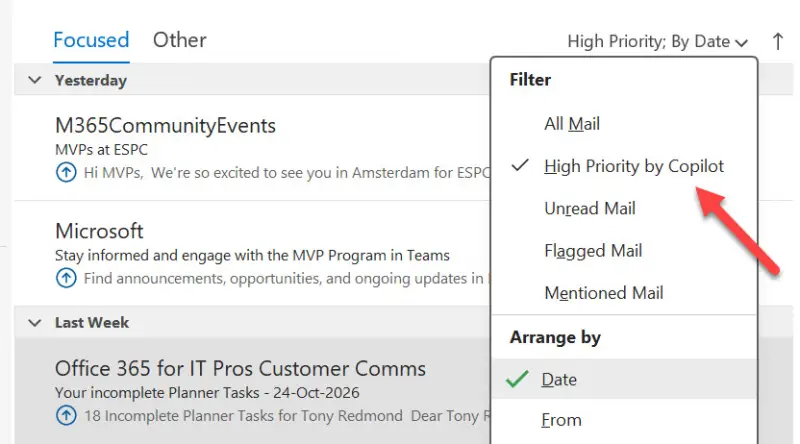
Outlook users who rely on Copilot to flag important email will lose the Prioritize My Inbox feature by the end of March 2027. Microsoft began withdrawing it on October 26, 2026, and says it will disappear from Outlook menus as the process reaches users. No action is required from users or administrators to remove it.
The change applies to people who currently have access to Prioritize My Inbox, which in practice means users with Microsoft 365 Copilot licenses. Microsoft described the retirement in message center notification MC1519861, updated 22 October 2026. The notification says the aim is to simplify the Outlook Copilot experience and focus Microsoft’s ongoing investment elsewhere. For administrators, the key point is that the feature is being removed from the interface through a staged withdrawal; the notice describes no setting or command that tenants need to run.
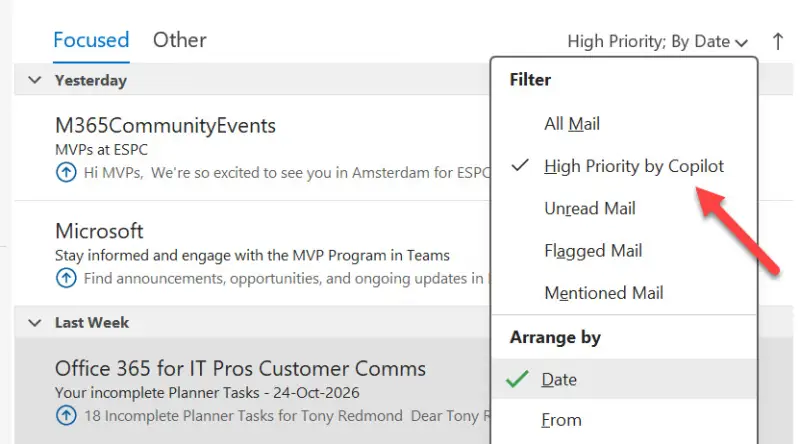
Prioritize My Inbox showed Copilot’s assessment alongside messages, including an upward arrow on snippets it judged to be high priority. Its departure leaves a familiar question for Outlook teams: how much should the inbox itself decide which messages deserve attention? Microsoft has tried several approaches to that problem, and the newest one is now being withdrawn.
From Clutter to Copilot
Microsoft’s earlier answer was Clutter, first presented at the Microsoft Exchange Conference in late 2012. Rather than highlight important messages in place, Clutter identified email it considered unwanted or unimportant and moved it to a separate folder. It learned from user behavior, with later options allowing users to provide instructions that could improve its classification.
Clutter reached Outlook Web App in late 2014, followed by years of adjustments. The approach could be useful, but its decisions weren’t always easy to predict. Users might find a message in Clutter without knowing why it had been moved, which made the feature feel like a black box. That uncertainty has followed Microsoft’s automated inbox tools ever since.
Focused Inbox Remains a Separate Option
Focused Inbox arrived with Microsoft’s mobile Outlook client, which grew out of the Acompli email app Microsoft acquired as it sought a stronger mobile email experience. Microsoft rebranded Acompli as Outlook for iOS and Android in early 2015. Focused Inbox became a prominent feature of that client and later spread across Outlook, with the desktop version receiving it in 2017.
Focused Inbox divides a folder into Focused and Other views. Outlook assigns new messages to one of those views, and users can correct a classification by moving a message between them. Those corrections help train the system over time. Users who have spent years making those adjustments may find the split useful; others may prefer to see all incoming mail in one place. The feature has remained controversial partly because, like Clutter, its decisions can be difficult to explain.
Focused Inbox is separate from Copilot’s Prioritize My Inbox and continues to be available. The two approaches could be used alongside each other, but both attempt to guide attention toward some messages over others. For Microsoft, maintaining overlapping tools may be harder to justify as it reshapes the way Copilot appears across its apps.
What the Retirement Signals
Prioritize My Inbox was a focused Copilot feature: it assessed incoming email and marked messages it considered important. Microsoft’s stated reason for retiring it is to simplify the Outlook Copilot experience and concentrate investment. That makes the decision part of a wider effort to bring Copilot into Office apps in a more coherent way, though the notice does not specify a replacement feature or a direct migration path.
Microsoft has also been developing broader assistant experiences, including Copilot Cowork and Autopilot, also referred to as Microsoft Scout. Those projects point toward assistants that can take actions for users, rather than offering only a single-purpose inbox ranking. The retirement itself doesn’t confirm that either product will replace Prioritize My Inbox. It does, however, raise the question of whether Microsoft sees message triage as a standalone feature or as one task for a more flexible assistant.
Prioritizing email remains a natural task for AI: users could describe what matters to them in everyday language and have an assistant apply those preferences as new messages arrive. But “important” depends on the person and the situation. A useful system needs to make its choices understandable and let users correct them without constant effort.
Microsoft 365 Copilot users who depend on Prioritize My Inbox should use the withdrawal window to review how they identify important messages in Outlook and whether Focused Inbox suits their workflow. The feature will be removed by the end of March 2027, while the longer-term direction of Copilot-based email prioritization remains unclear.


