- Subject
- Microsoft 365 & SharePoint
- Filed
- Source
- Tony Redmond
- Loans
- 902
Microsoft Entra Conditional Access Policy Plans: Preview Features and Admin Considerations
Entra ID policy plans group shared conditions across related rules. Preview limits and a token-handling caveat make careful testing essential.
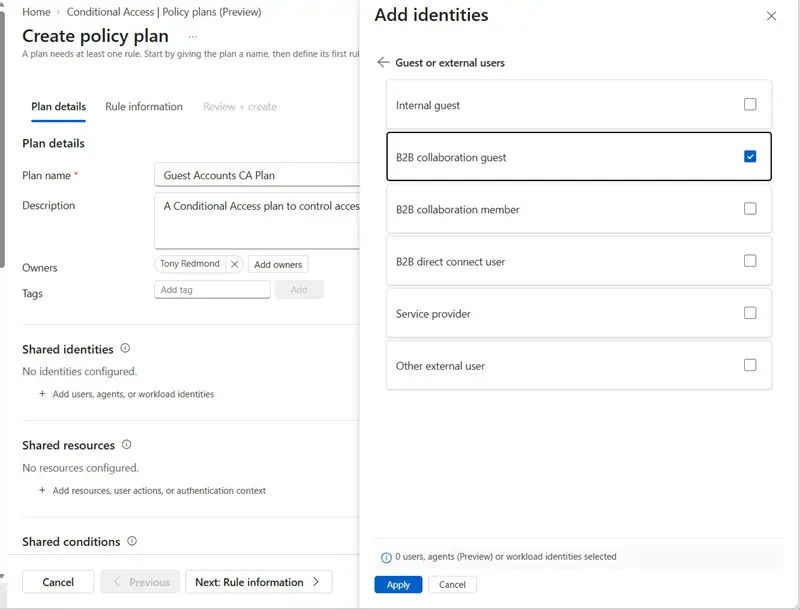
Microsoft’s preview of Conditional Access policy plans gives Entra ID administrators a way to organize related access rules around shared settings. The feature could reduce duplicated configuration in mature Microsoft 365 tenants, where years of security changes often leave administrators managing policies with overlapping assignments, conditions, and exclusions.
That’s useful because Conditional Access decisions affect whether people can reach tenant resources and which controls, such as multifactor authentication, they must satisfy. Policies evaluate signals including identity, device state, location, application, and risk. When similar rules are maintained separately, an update to one can leave others out of sync. Administrators may also hesitate to consolidate policies because an unintended change could create an access gap.
One shared configuration for related rules
A policy plan groups related Conditional Access rules under a plan containing its own details, shared conditions, and individual rules. The key change is that administrators can configure common conditions once at the plan level, then have the rules inherit them. Microsoft is previewing the feature in the Entra admin center.
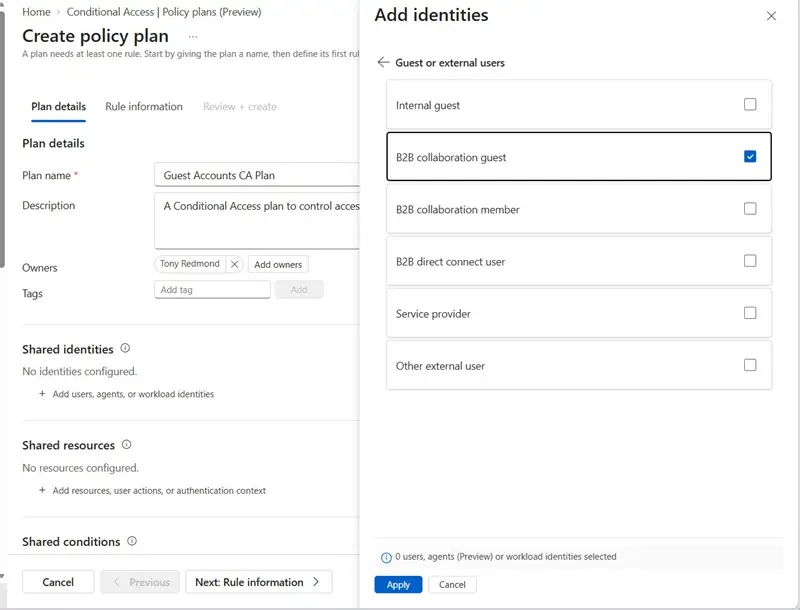
Shared conditions can cover identities, resources, risk, device platforms, locations, and client application types. The practical value is clearest when multiple rules need the same assignments or exclusions. For example, an organization may exclude two breakglass accounts from every Conditional Access rule so administrators retain emergency access if a problem occurs. If ten policies carry that exclusion separately, each must stay aligned as the configuration changes.
Device targeting presents another common pattern. An organization might use separate rules for Windows, macOS, iOS, and Android, while applying the same user targeting and emergency access exclusions to each. A plan can hold those shared settings centrally and pass them to the rules. That should make related configurations easier to review and reduce the chance that small differences accumulate unnoticed.
Conditional Access has gained features over time, including authentication strength controls for the method used during multifactor authentication. Organizational changes and new capabilities can both add to policy sprawl. Plans offer a structure for managing related rules as that configuration grows, though they don’t remove the need to understand what each rule permits or blocks.
Plans don’t change access evaluation
Microsoft describes policy plans as an organizational tool, not a new access enforcement mechanism. Individual rules within a plan still represent Conditional Access decisions, and existing standalone policies can remain in place alongside plans.
At sign-in, applicable standalone policies and plan rules are evaluated independently. There’s no precedence that lets one policy override another: every applicable policy and rule must be satisfied for access to be granted. Administrators therefore need to assess the combined effect of existing policies and any rules introduced through a plan. Grouping configuration changes how it is maintained; it doesn’t change the underlying requirement to satisfy all applicable controls.
Review proposed migrations before changing policies
For organizations with established deployments, Entra can analyze selected existing policies and suggest a plan structure with shared conditions and individual rules. Microsoft’s migration guidance describes that process. The analysis doesn’t modify the selected policies, giving administrators a chance to inspect the proposed structure before deciding whether to use it.
That review step addresses a difficult operational problem. Designing a tidy policy structure in a new tenant is relatively straightforward; restructuring accumulated rules while preserving the intended access controls takes more care. Administrators should compare the proposed shared settings with the policies they currently use and check whether each rule still has a clear purpose. Experience from migrations at production scale will help show how well the proposals handle the varied configurations organizations have built over time.
Preview limits and a token behavior to check
Policy plans remain a preview feature, and Microsoft lists several restrictions. Plan-level targeting can’t be narrowed by individual rules. Rules can’t remove exclusions inherited from the plan. Shared conditions can’t combine identity types, and the All resources assignment is available only at the rule level.
There’s also a specific access-token behavior administrators should account for: during the preview, users targeted by policy plans that use Location as a condition receive one-hour access tokens without an instant IP enforcement check. Teams evaluating location-based plans should include this behavior in their review of sign-in and access requirements.
Microsoft says each rule appears separately in sign-in logs, which can help administrators trace decisions during troubleshooting. Before adopting plans at scale, teams should also consider how they fit with their existing Conditional Access tools and processes, including Microsoft Graph and PowerShell support and configuration backup and recovery. The feature’s value will depend on whether it makes a mature deployment easier to understand and maintain while preserving the intended controls. Testing representative rules and reviewing the resulting sign-in behavior will give administrators a firmer basis for deciding whether to migrate.


