- Subject
- Microsoft 365 & SharePoint
- Filed
- Source
- Tony Redmond
- Loans
- 935
Microsoft Graph AuditLogQuery Script Conversion Requires More Than Cmdlet Changes
AuditLogQuery uses queued jobs and changes record properties and AuditData formats, so PowerShell scripts need careful updates and testing.
Moving PowerShell scripts from Search-UnifiedAuditLog to Microsoft Graph’s AuditLogQuery API changes how searches run and how results are shaped. Administrators must update the query flow, property references and audit data handling; replacing one cmdlet with another won’t produce a reliable conversion.
Search-UnifiedAuditLog runs synchronously: it processes a query and returns records in the same call. AuditLogQuery uses queued jobs. A script submits a query, checks its status while Purview Audit processes it, and retrieves the records after completion. That shift can affect scripts that expect an immediate answer, especially checks for the latest file or email created by a user. Processing may take ten minutes or longer, depending on service load and the number of requested records.
Record fields change across the APIs
The unified audit log includes mandatory fields such as the operation, timestamp and actor. Much of the detail administrators need, however, sits in AuditData. Its contents vary by Microsoft 365 workload because each workload determines which properties it records. SharePoint Online data may be relatively straightforward to interpret, while Entra ID license assignment records can include harder to parse product SKU details.
AuditLogQuery also changes several header property names. For example, UserIds becomes UserPrincipalName, Operations becomes Operation, and CreationDate becomes CreatedDateTime. These names align with conventions used elsewhere in Graph, but converted scripts must use the names returned by the new API throughout their filtering and output logic.
Handle AuditData according to the retrieval method
Scripts built around Search-UnifiedAuditLog commonly parse the JSON in AuditData with a command such as:
[array]$AuditData = $Rec.AuditData | ConvertFrom-Json
That parsing step doesn’t carry over unchanged. A direct Graph API request returns AuditData as a PowerShell object whose properties can be referenced directly:
$Rec.AuditData.SiteUrl
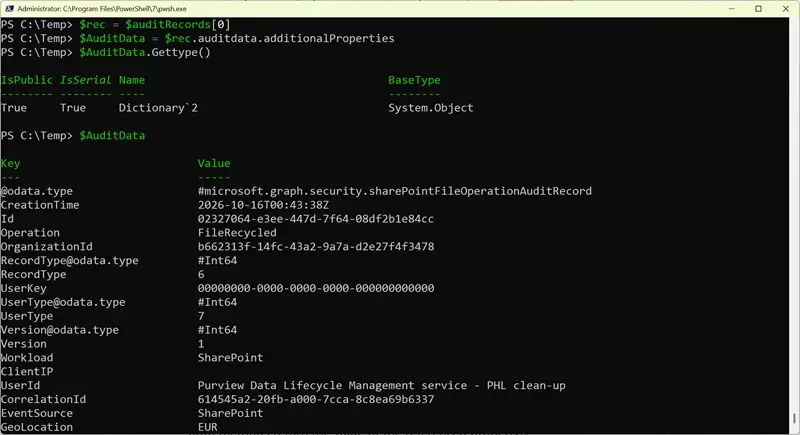
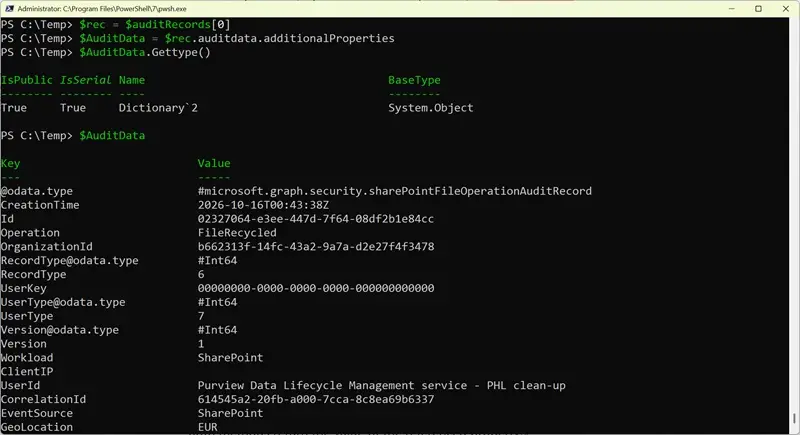
Records retrieved with Get-MgSecurityAuditLogQueryRecord use a different structure. The audit data is held in the additionalProperties property as a dictionary of name and value pairs, because the workload specific fields aren’t strongly typed in the Graph SDK model. A script can assign the dictionary to a variable like this:
$AuditData = $Rec.AuditData.additionalProperties
$Auditdata.GetType()
The dictionary entries can then be read with dot notation or a key lookup:
$AuditData.SiteUrl
$AuditData["SiteUrl"]
Both forms return the value for the entry. Case matters when accessing these dictionary keys: SiteUrl retrieves the value, while siteUrl does not. Conversion and testing should cover the precise property names returned for the records being processed.
Rework the query and processing sequence
A converted script needs a Graph session with the appropriate permissions. AuditLogsQuery.Read.All is one example of a permission that allows access to audit events generated by all workloads. Query parameters can be supplied as named parameters to New-MgSecurityAuditLogQuery, or as properties in a request body when making Graph API requests. Direct API requests require a request body. Parameters such as ResultSize, SessionId and SessionCommand have no Graph API equivalent.
The work then follows the job lifecycle: submit the query, monitor the job until processing finishes, retrieve the records into an array, and extract the audit data the script needs. During extraction, check both the header names and the representation of AuditData, which varies with the retrieval method.
The query filters have corresponding names in the Graph cmdlet, but they don’t map one for one in every case:
| Search-UnifiedAuditLog | New-MgSecurityAuditLogQuery | Purpose or note |
|---|---|---|
| UserIds | UserPrincipalNamesFilter | Array of user principal names to search. |
| No equivalent | AdministrativeUnitIdFilters | Array of administrative unit identifiers to limit results. |
| StartDate and EndDate | filterStartDateTime, filterEndDateTime | Search start and end times. Some organizations use UTC for all searches. |
| RecordType | recordTypeFilters | Array of record types, such as ExchangeOnline. See Microsoft Graph audit log record types. |
| Operations | operationFilters | Array of actions, such as MailItemsAccessed and FileModified. |
| ObjectIds | objectIdFilters | Array of object identifiers. |
| FreeText | keywordFilter | Free text search of audit records. |
| IPAddresses | ipAddressFilter | Array of IP addresses. |
Other dependencies may also need replacement. A script that builds a lookup of mailbox users and display names with Exchange Online’s Get-ExoMailbox may need Graph code using Get-MgUser when the audit job runs through Graph.
Test with realistic query volumes
A sample script for analyzing system events retrieves audit records from the last seven days, then removes records for actions performed by tenant users so it can focus on system activity. In larger tenants, the query period needs to be shorter to stay within the 50,000 record limit cited for Search-UnifiedAuditLog. The Report-NonUserAuditEvents.PS1 script includes code for both retrieval methods.
For administrators, the practical conversion task is to check the whole path: permissions, query filters, job timing, returned field names, AuditData access and any supporting directory lookups. Test the rewritten script against the workloads and record types it actually processes, then account for queued processing wherever the workflow depends on a fast response.


