- Subject
- Microsoft 365 & SharePoint
- Filed
- Source
- Tony Redmond
- Loans
- 976
Exchange Online’s November 2026 Outage: Root Cause, SLA Credits and Admin Takeaways
A gateway failure disrupted Exchange Online for 23 hours and 50 minutes. Here’s what Microsoft’s preliminary report says and what admins should check.
Exchange Online’s November 2026 outage exposed a weak point in Microsoft 365 that sits beneath the services users see: the shared networking gateways that accept and route connections. A latent Windows defect, increased traffic and reduced gateway capacity combined to trigger failures that spread across regions. The result was a disruption lasting 23 hours and 50 minutes, with effects across Exchange Online and other Microsoft 365 services.

For IT teams, two questions follow. What failed, and what does the incident mean for service availability and possible credits? Microsoft’s preliminary reports offer a detailed account of the technical chain, while the service-level terms make clear that any credit depends on the affected service, measured user impact and claim process.
Two incident records, one outage
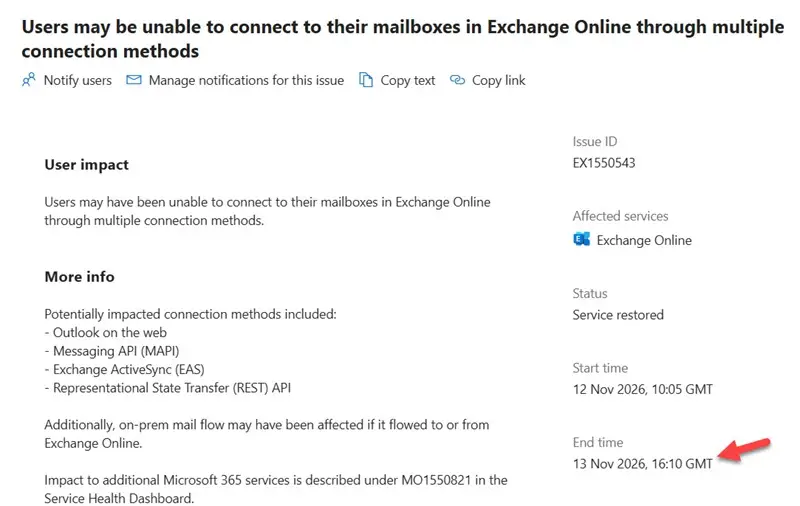
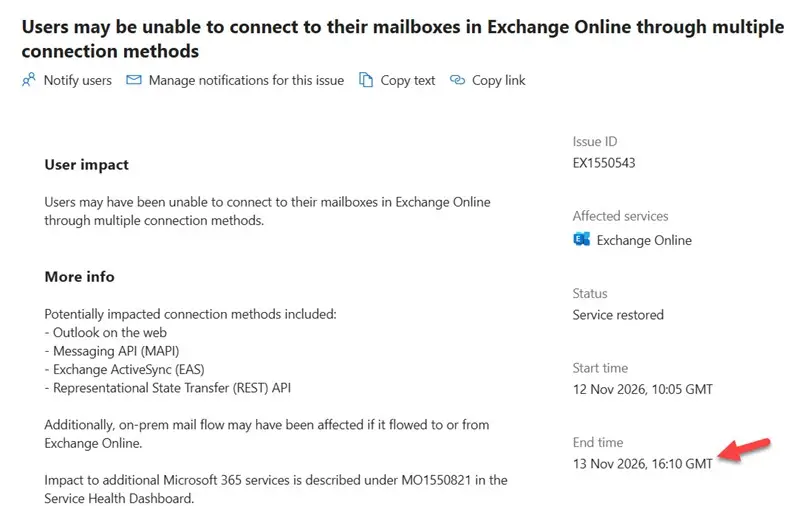
Microsoft tracked the Exchange Online incident as EX1550543. Its service history gives a start time of 16:20 GMT on November 12, 2026. A separate figure in the history displayed 10:05 GMT, which appears inconsistent with the other timings. Service began returning for at least one tenant at about 10:00 GMT on November 13, nearly 18 hours after the reported start. Microsoft’s preliminary Post-Incident Report, issued November 16, set the incident’s full duration at 23 hours and 50 minutes.
MO1550821 covered the knock-on effects on other Microsoft 365 services. Its preliminary report gives the same start and end times and the same root cause as EX1550543. Microsoft therefore treated both incident records as covering the same 23-hour-and-50-minute period.
The distinction matters when administrators review service health. The Exchange incident describes the core failure; the broader record captures consequences for services that rely on Exchange Online or shared networking infrastructure. The two records don’t mean two separate outages.
The gateway failure was not an Outlook client defect
Outlook became the most visible face of the incident because that’s where many users encountered missing or delayed email. The underlying problem was in Exchange Online’s service infrastructure, not in Outlook itself. Client behavior varied: classic Outlook’s offline capabilities helped it cope better than the new Outlook in some circumstances. Mobile clients had fewer options when they couldn’t reach the service.
Other mail clients were affected too. Apple iOS and Samsung mail clients can connect through Exchange ActiveSync, while Thunderbird and other applications may use POP3 or IMAP4. These clients depend on Exchange Online endpoints just as Outlook does. The choice of mail application could change what a user experienced, but it didn’t remove the service-side dependency.
Microsoft said there was no indication of malicious or cyber activity. Charles Lamanna, Microsoft EVP for Copilot, Agents, and Platform, described the event as involving “cascading failures + thundering herds at our network perimeter.” That points to a service reliability problem: failed capacity redirected demand onto infrastructure that was already under strain.

Three conditions triggered a latent defect
Microsoft’s preliminary account identifies three conditions that converged. None alone explains the full scale of the failure; together, they activated a defect in the networking gateway infrastructure.
- A Windows defect that had been present for months. A Microsoft 365-specific Windows change began rolling out globally in July. Under certain loads, a defect in that change could cause lock contention. The resulting CPU and memory exhaustion left gateway servers unresponsive. The issue was more likely to appear on newer hardware with higher core counts than on the less powerful systems used for load testing, which helps explain why it escaped detection.
- More traffic on the primary gateway. About 15 hours before the outage, Teams failed over from an alternative networking gateway to the primary gateway also used by Exchange Online. Microsoft described this as a normal resiliency operation. But it increased the load on the primary gateway and changed the traffic pattern it had to handle.
- Less available capacity. A separate problem had already taken about 14% of gateway server capacity offline. Microsoft believed enough spare capacity remained. In combination with the Teams traffic shift, however, the reduced capacity created conditions in which the Windows defect could exhaust resources.
The failure then spread beyond the original capacity problem. Microsoft said a separate issue prevented the usual isolation boundaries, or “bulkheads,” between gateway capacity units and regions from containing the cascading effects. Those boundaries are intended to limit how far a fault can travel. Their failure to do so is likely to be a central question in the final report.
Other services had more options to move traffic away from affected gateways. Teams, OneDrive, SharePoint and Office apps recovered earlier, while Exchange Online couldn’t fail away at the scale required. That difference helps explain why email remained disrupted after some related services began to recover.
Why recovery took so long
Restoring servers did not immediately restore service. As gateway servers returned, accumulated traffic rushed back and overwhelmed them, causing further failures. Microsoft’s automated recovery systems weren’t designed for a situation in which such a large portion of the infrastructure was unresponsive at once.
A standard rollback wasn’t available either. The Windows change had been deployed successfully more than three months earlier, so the usual response to a recent deployment issue didn’t fit. Microsoft identified the defect, built a fix that restored the previous known-good Windows code path, then recovered capacity in controlled groups: servers were taken offline, updated, restarted and returned to service gradually.
The sequence described in the preliminary report is a warning about interacting failure conditions. A latent software defect met higher traffic and 14% less capacity; resource exhaustion took servers offline; traffic shifted onto remaining capacity; and the failures cascaded. Microsoft has said it will publish a final Post-Incident Report, which should provide a fuller account of the gateway isolation failure and recovery.
The affected infrastructure serves a very large workload. Microsoft speakers at the MEC 2022 conference said Exchange Online then spanned 300,000 physical mailbox servers and handled 9.2 billion messages daily. Microsoft hasn’t published an updated server count. Those historical figures illustrate the scale of the service, but they don’t establish how many servers were affected in November 2026.
Exchange Online supports more than email
The outage also showed how deeply Exchange Online is connected to Microsoft 365. SharePoint Online can use Exchange Online to send file-sharing links, and Teams uses it for meeting scheduling. Exchange Online also stores compliance records associated with features such as Microsoft Copilot. When its performance declined, dependent workflows in other services could break even when those services’ own data or applications remained available.
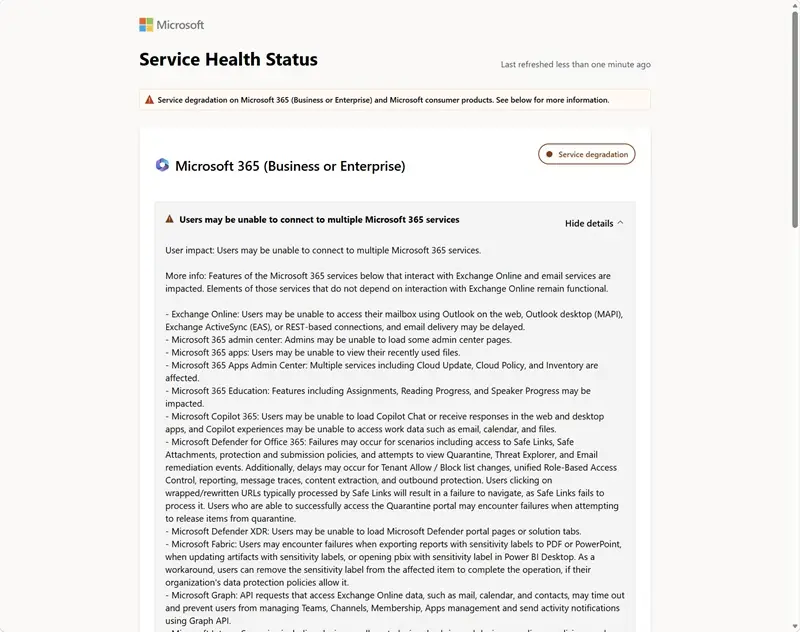
The practical effect depended on the workload. People could still work with files in SharePoint Online and OneDrive for Business libraries, yet sharing those files could fail if Exchange Online couldn’t deliver notifications. Copilot Chat might also fail when it couldn’t connect to Exchange Online to store compliance records. A service can therefore remain partly usable while a connected feature is unavailable.
That complexity makes outage assessment harder for administrators. The visible symptom may appear in Teams, SharePoint or Copilot, while the dependency sits in Exchange Online or shared networking. Microsoft’s service updates listed multiple affected services, but each service experienced a different type and degree of disruption.
The article’s author said there was no known evidence that Microsoft’s recent staff reductions left the company without the expertise needed to resolve the incident. Experienced engineers had left during the year, but whether retaining them would have accelerated diagnosis or recovery cannot be established. The author also questioned how many engineers have handled a worldwide outage on this scale. The potential user population was estimated at around 500 million, based on more than 470 million paid Microsoft 365 seats reported for FY27 Q1 plus free seats used by partners and others.
What the outage could mean for uptime credits
Microsoft’s service-level agreement defines Exchange Online downtime in terms of users being unable to send or receive email with Outlook Web Access. That gives the calculation a direct connection to the service: OWA communicates with the server rather than relying on a client’s offline cache. Microsoft measures downtime in user-minutes, so tenants can have different results depending on which users were affected, when access returned and the datacenter region they use.
November has 43,200 minutes. If every user in a tenant had been unable to access Exchange Online for the full preliminary duration of 23 hours and 50 minutes, or 1,430 minutes, the illustrative monthly uptime would be:
(43,200 − 1,430) / 43,200 = 96.69%
That falls below 99% and above 95%, the range associated with a 50% service credit under Microsoft’s published schedule. It is only a guide: tenants with partial impact or staggered recovery need user-minute calculations that reflect their actual experience. The author’s quarterly Microsoft 365 tracking showed 99.526% uptime in the first quarter of 2026, the lowest result since tracking began in 2013. The November event ranks among the largest Microsoft 365 outages by that historical comparison.
The credit schedule lists 25% for uptime below 99.9%, 50% below 99%, and 100% below 95%. Credits apply against future fees for the affected service; Microsoft’s terms describe them as the sole remedy for performance or availability issues and say they don’t compensate for other forms of loss.
Many organizations buy Microsoft 365 bundles rather than Exchange Online alone. A 50% credit tied to Exchange Online uptime doesn’t mean 50% of a Microsoft 365 E5 subscription fee. The relevant amount depends on the affected service, its applicable monthly service fees and the agreement’s terms. For context, Microsoft lists U.S. Exchange Online Plan 2 at $8 per user per month. That standalone price doesn’t establish how Microsoft values Exchange Online within an E5 subscription, listed in the source at $60 per user per month.
Other affected services require separate assessment under their own terms. A file-sharing notification failure, for example, may leave SharePoint files accessible while preventing one function. Whether that qualifies as downtime depends on how availability is defined for that service. The same issue applies to other connected features, so determining eligibility and credit amounts may involve reviewing each service’s conditions and user impact.
Microsoft doesn’t apply credits automatically. Customers must submit a claim through the Microsoft 365 admin center or through their Cloud Solution Provider (CSP). Claims for the November 2026 incident must be filed by the end of December 2026. Admins should preserve their incident timeline and affected-user records while checking the relevant service terms.
Resilience planning needs to include dependencies
The incident renewed the familiar debate about cloud reliability and on-premises infrastructure. An on-premises Exchange Server failure can be severe for one organization; a cloud infrastructure failure can affect many organizations at once. Neither deployment model removes the need to plan for service disruption. The difference is how widely the consequences can spread.
Exchange Online has mailbox database resilience through Database Availability Groups (DAGs), and tenants are distributed across forests made up of DAGs. The preliminary account points instead to the infrastructure that accepts and routes connections as the exposed weakness. For planning purposes, resilient mailbox storage and resilient access paths solve different problems.
Organizations should map workflows that depend on Exchange Online, including meeting scheduling, sharing notifications and compliance records, then identify how those workflows behave when email access is impaired. The incident also raises questions about future workloads that may use agents to access mailbox data or act for users. Satya Nadella has discussed a Microsoft with 200,000 employees and perhaps 2 million or even 20 million agents “all in a loop.” If similar deployments spread beyond Microsoft, administrators will need to understand the load and service dependencies they introduce.
The final report should clarify what Microsoft changes to gateway isolation, load testing and recovery after this event. Until then, the most useful takeaway for IT teams is concrete: treat Exchange Online as a shared Microsoft 365 dependency, record which connected functions fail during an incident, and review service-credit eligibility against measured user impact and the claim deadline.


