- Subject
- Microsoft 365 & SharePoint
- Filed
- Source
- byungji kwon
- Loans
- 744
VMware Cloud Foundation 9.1: Seven Layers to Harden Private Cloud Security
VMware Cloud Foundation 9.1 centralizes identity and certificate controls. Seven defensive layers help teams limit access, contain intrusions and protect recovery data.
AI assisted attacks put pressure on the time IT teams have to assess and contain a vulnerability. Broadcom says its testing with frontier AI models showed how several low risk flaws can be linked into a more serious attack path. It also warns that AI can shorten the gap between vulnerability disclosure and working exploit code from weeks to almost real time. For private cloud operators, that makes basic infrastructure controls and recovery planning part of the same security job.
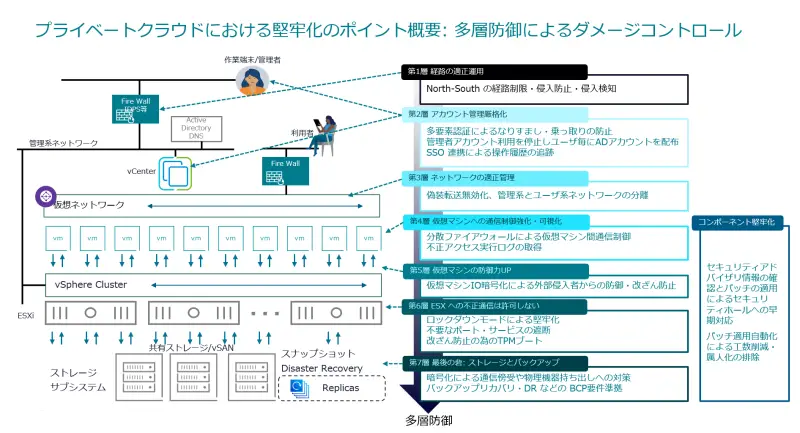
The approach described here uses seven layers across VMware vSphere environments. They cover access to the management plane, identities, network traffic, virtual machine communications, workload data, ESX hosts, and backups. The aim is to limit the chance of intrusion and reduce its reach if an attacker gets in. VMware Cloud Foundation (VCF) 9.1 adds centralized identity, password and certificate management features that can support some of these controls.
Start with management access and identity
The first layer protects north-south traffic between external networks and the private cloud. vCenter Server and ESX management addresses should sit on private networks and receive no direct routes from the public internet. A dedicated management VLAN separates administrator access from virtual machine traffic, reducing the chance that a compromised workload can reach the hypervisor management plane.
Administrators connecting from other locations should use a trusted, encrypted route such as a VPN. That gateway needs prompt security updates, and access should use multifactor authentication (MFA). Where administrators connect from known locations, restricting VPN access by source IP can further narrow exposure.
The second layer strengthens accounts. Connect vCenter Server to an identity provider or directory service, enable MFA, and assign individual accounts with only the permissions each person needs. Shared day-to-day use of built-in administrator accounts makes it harder to attribute actions and increases the impact of stolen credentials.
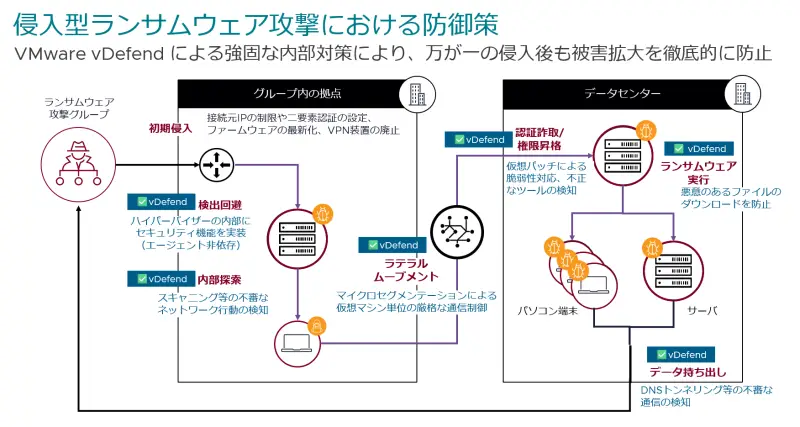
VCF 9.1 expands integrated single sign-on (SSO), password and certificate management. Its Identity Broker (VIDB) mediates SSO connections between VCF components and externally managed identity providers or directory services. VIDB is installed during VCF deployment or upgrade, so it no longer needs a separate download as a prerequisite for configuring SSO.
VCF Operations can define password length, complexity and expiration requirements centrally, then apply them across a VCF fleet, management components or individual instances. Its interface also supports certificate review, certificate signing request generation, and importing or renewing certificates signed by an external certificate authority. Fleet Lifecycle validates certificates and requires the Subject Alternative Name to include both the fully qualified domain name and IP address. Teams planning an upgrade should check certificate inventories against that requirement.
Separate network roles and control VM traffic
The third layer divides network traffic by function. Keep management, vMotion, storage traffic such as iSCSI, NFS or vSAN, and user workloads in separate network segments. Physical NIC separation may be possible; where traffic shares hardware, IEEE 802.1Q VLANs can provide logical separation. Apply access control lists to the management VLAN so that only designated administration systems can connect.
Review virtual switch security settings as well. Forged transmits allow a guest to send packets with a source MAC address different from the one assigned to its virtual NIC. With the setting at Reject, the virtual switch compares the packet's source address with the assigned address and drops a mismatch. The source describes Reject as the default from vSphere 7.0 onward.
Promiscuous mode and MAC address changes are two related settings that should also be reviewed; the stated best practice is to set all three to Reject. Some workloads may need an exception, including nested ESX, Microsoft Network Load Balancing in unicast mode, certain network appliances and VMware Cloud Foundation Operations HCX network extension. If an exception is necessary, apply it to the specific virtual machine's port group rather than broadly changing the switch configuration.
The fourth layer limits communication between virtual machines. A perimeter firewall may leave traffic within the same segment unchecked, giving an intruder room to move from a compromised web server toward a database or administration system. VMware vDefend Distributed Firewall (DFW) applies controls at the ESX hypervisor, close to each virtual network interface. Policies can follow a VM when it moves with vMotion and can be applied without changing existing IP or VLAN arrangements.
DFW rules can use application identification, domain names and VM tags as well as addresses and ports. For example, an administrator can allow a web server to reach a database only on the required SQL port. A tag based rule can apply automatically to a newly created VM once it receives the relevant tag. The source also describes using integrated distributed intrusion detection and prevention to detect or block known attack patterns, and rule logging to record permitted and denied flows. Security Intelligence can map VM communications and suggest rules based on observed traffic.
Protect workloads and restrict host services
The fifth layer protects VM files and traffic through vSphere VM Encryption. Encryption runs at the ESX layer and can cover VM files such as VMDKs, VMX files and snapshots without requiring a guest OS agent or application changes. Encrypted vMotion can protect data while a VM moves between hosts. The source says encrypted VMs can run only on appropriately configured ESX hosts, and that TPM hardware can help check hypervisor integrity.
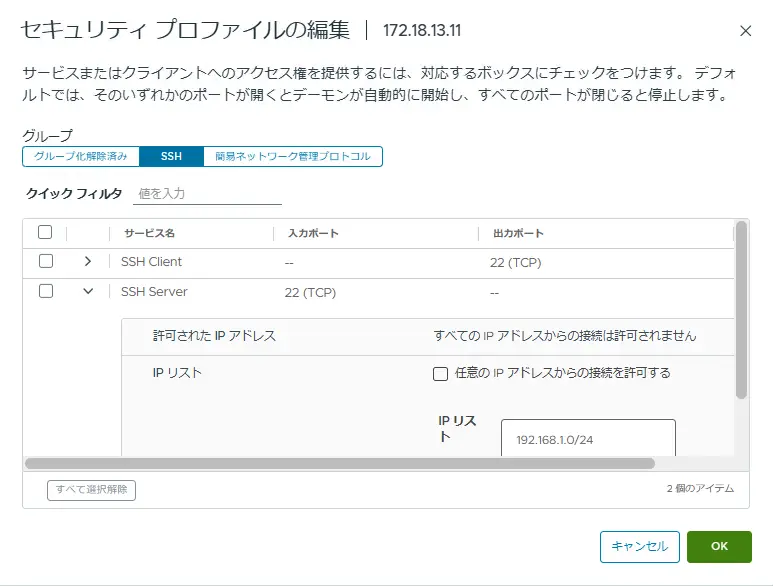
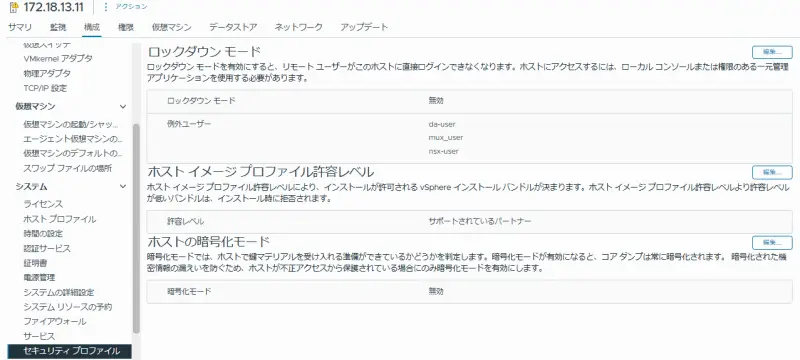
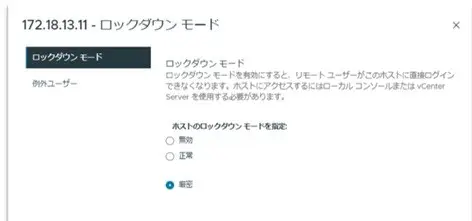
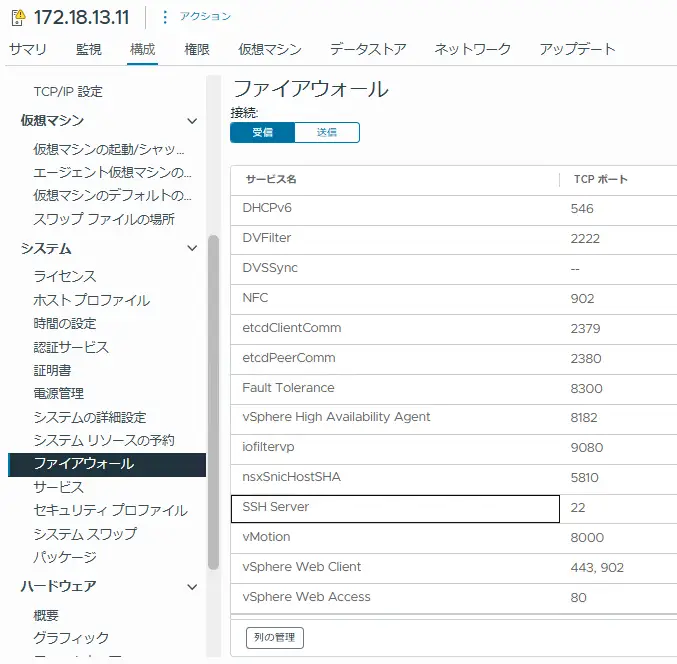
The sixth layer reduces direct access to ESX hosts. Lockdown mode directs management through vCenter Server. Normal mode restricts direct vSphere Client logins while retaining local DCUI access; Strict mode also stops the DCUI service. SSH and ESX Shell should generally stay disabled and be enabled temporarily for troubleshooting. If SSH must remain available, limit its allowed source IP addresses through the ESX firewall.
UEFI Secure Boot and TPM 2.0 can check the integrity of startup components. Secure Boot allows signed, trusted components to load, while TPM measurements support remote verification of the boot state. These settings depend on compatible server hardware and should be checked as part of host configuration.
Make recovery data harder to destroy
The seventh layer assumes that prevention can fail. vSAN Data-at-Rest Encryption protects stored data, while backup isolation and immutability make recovery possible if production systems are compromised. The source cautions against combining vSAN encryption with VM Encryption without a specific requirement, since double encryption may increase CPU load and reduce deduplication efficiency.
Keep backup infrastructure outside the production Active Directory domain, or use a separate backup domain. Disconnect backup networks except when needed, or use an isolated copy path. Immutable storage, including S3 Object Lock or on-premises options, can prevent deletion or alteration during a defined retention period. A cyber recovery vault adds a separated copy and can scan stored data for signs of malware.
VCF Protection and Recovery and VMware Advanced Cyber Compliance are described as combining immutable backups with recovery into an isolated environment and malware scanning there. Whatever tools are in place, stored backups need regular recovery tests. The source recommends testing at least twice a year in a separated network, verifying that restored operating systems and applications actually work. Define recovery time and recovery point requirements, then confirm that the process can meet them.
Turn hardening into routine operations
These layers depend on ongoing review: identify gaps, enable available controls, and check the operational effect of each change. Many of the cited protections use existing platform features or require limited additional investment, though requirements vary by environment. Start with management exposure, MFA, network separation, host access and backup recovery. Then validate exceptions and test recovery paths so that controls remain workable as the private cloud changes.


