- Subject
- Microsoft 365 & SharePoint
- Filed
- Source
- Microsoft 365 Platform team
- Loans
- 916
Microsoft 365 Developer Program Retires Legacy Sandboxes as New Options Arrive
Legacy sandboxes are being retired. Eligible developers get one final 60-day renewal to move work to a new tenant, where paid add-ons are optional.
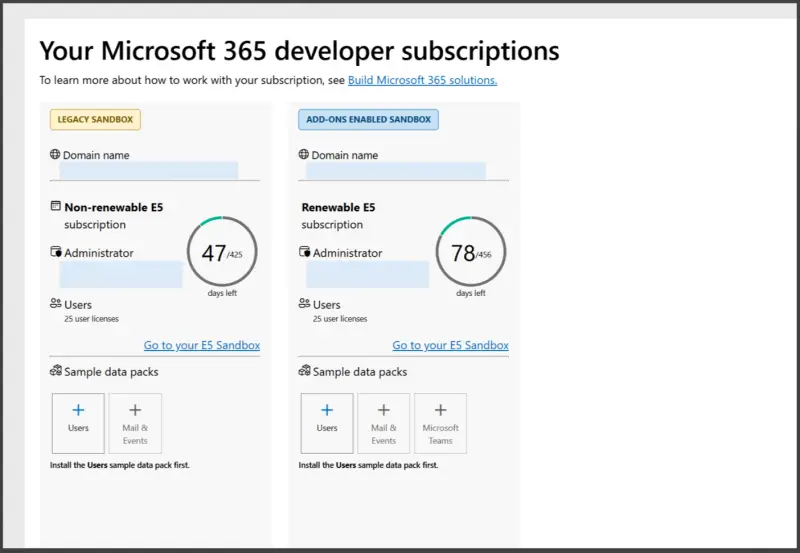
Microsoft 365 Developer Program members with a legacy sandbox need to plan a tenant migration: the subscription can’t be converted or extended again, and its data will be permanently deleted after the retirement process. Eligible members get one final 60-day renewal to prepare a replacement. The new sandbox model also supports optional paid add-ons, including Microsoft 365 Copilot and Copilot Credits.
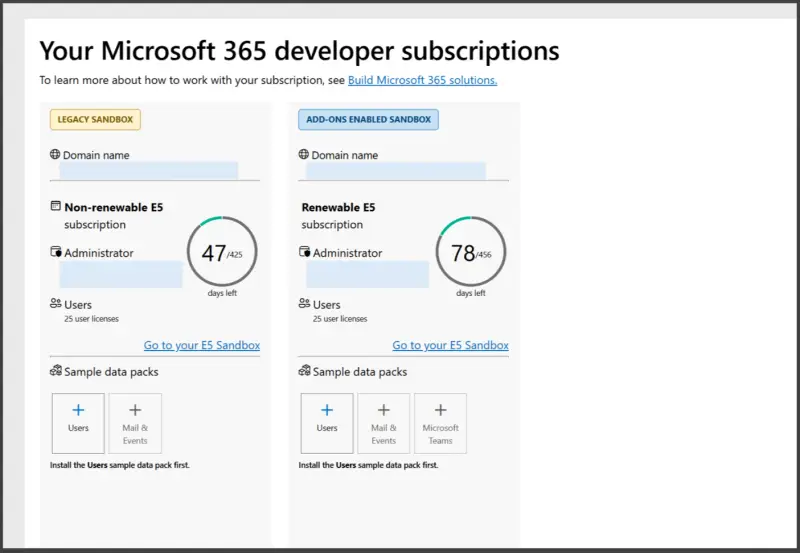
Start by signing in to the Developer Program dashboard with the account used to join. A “Legacy sandbox” label means the subscription is being retired. This applies to legacy subscriptions linked to Visual Studio as well. Sandboxes with add-on purchases enabled aren’t affected, and the change doesn’t alter Developer Program membership.
Plan around the expiry and deletion dates
For developers who still meet the program’s eligibility requirements, the legacy subscription receives one final 60-day renewal. Microsoft says it will email members when that renewal is applied. Use the available time to create a replacement sandbox as soon as the option appears and move development work before the legacy subscription expires.
Members who are no longer eligible won’t receive a renewal. Their subscription expires at the end of its current term. Check the dashboard for the expiry date, and review notification emails for the deletion date; these dates determine how much time remains to move data and rebuild the environment.
After expiry, the subscription becomes read-only. Access is limited to administrators for data recovery before the tenant and its data are permanently deleted. Once deletion occurs, the sandbox can’t be restored. The retirement FAQ provides further details: Microsoft 365 Developer Program legacy subscription retirement FAQ.
The replacement is a new tenant with a different domain and tenant ID. There’s no automatic transfer from the legacy sandbox, so treat the move as a rebuild. Back up the information you need, then plan to redeploy apps and recreate required configuration in the new environment. Teams should identify dependencies on the old tenant before expiry, since its domain and tenant ID won’t carry over.
Legacy subscriptions can’t be converted or extended again. That makes the dashboard label and expiry date useful planning signals: once a sandbox is marked for retirement, migration preparation needs to happen within the remaining term.
What the new sandbox model changes
The Microsoft 365 E5 developer sandbox remains free for eligible developers, and the program’s eligibility requirements are unchanged. The new model adds the option to purchase paid add-ons, including Microsoft 365 Copilot and Copilot Credits. A billing account is required during setup for verification, but Microsoft says the free developer sandbox itself isn’t charged. Charges apply only if you choose to buy add-ons or subscriptions.
New developer sandboxes are eligible for renewal every 60 days based on qualifying development activity. That renewal detail is separate from the one final 60-day renewal for an eligible legacy subscription: the latter is a transition window to create a replacement and move work.
The free E5 subscription remains limited to development and testing. Buying an add-on doesn’t change that condition. Microsoft says the developer subscription can be revoked if it’s used for purposes other than development, as described in the Microsoft 365 Developer Program Terms and Conditions.
If you later want to use the tenant outside the Developer Program, you’ll need to buy the Microsoft 365 subscriptions and licences that cover the services you intend to use. In other words, optional add-ons expand what you can test in the developer environment, but they don’t turn the free E5 developer subscription into a general-purpose tenant.
Choose a route if you don’t qualify
Eligible developers can continue to join the program and request a sandbox. Review the Microsoft 365 Developer Program FAQ for eligibility details. If you don’t qualify, Microsoft points to a Microsoft 365 trial or a business plan as alternatives, where you can select the licences and add-ons required for your solution.
For current members, the practical next step is to check the dashboard now. If it shows “Legacy sandbox,” confirm the expiry date, watch for the renewal email if you remain eligible, and start backing up and rebuilding while the old tenant is still available.


