- Subject
- Microsoft 365 & SharePoint
- Filed
- Source
- Steve Pucelik
- Loans
- 824
SharePoint Embedded Adds Admin Center App, Container and Billing Management
Admins can create SharePoint Embedded apps, manage containers, configure billing and archive inactive content through Microsoft 365 admin centers.
SharePoint Embedded is adding more of its setup and management work to Microsoft 365 admin centers. For IT teams supporting custom applications, the changes bring app registration, ownership, container controls and billing into familiar admin interfaces, giving developers a clearer starting point and administrators more ways to manage the service.
SharePoint Embedded is an API-only, cloud-based document management platform. Custom apps supply the user experience; SharePoint Embedded supplies Microsoft 365 content capabilities, including Office collaboration, Microsoft Purview security and compliance, and Copilot experiences. That makes administrative setup part of the application’s foundation: the app, its container type, owners and billing arrangement all need to be established as development and deployment progress.
Create and track apps in the SharePoint admin center
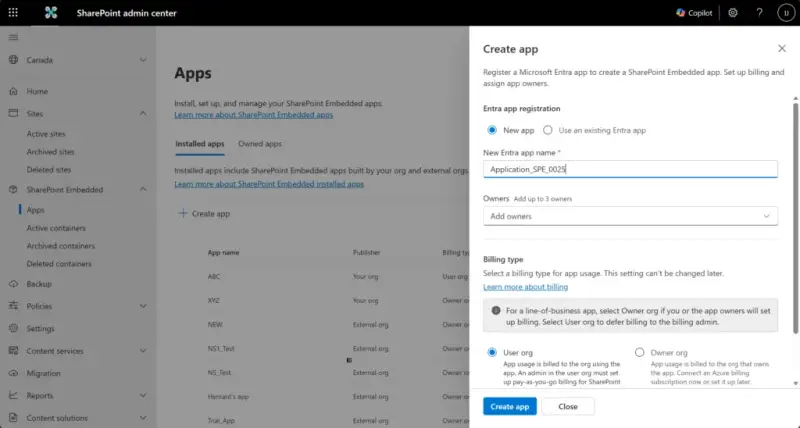
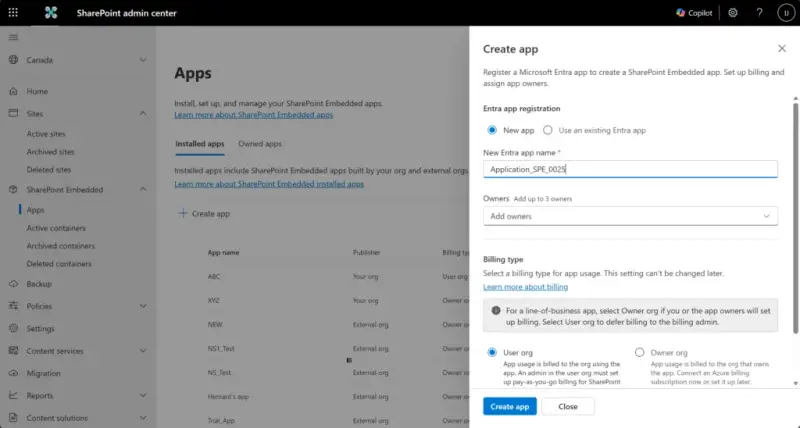
SharePoint Embedded and Global admins can go to SharePoint Embedded > Apps in the SharePoint admin center to create apps owned by their organization. A guided panel can create a Microsoft Entra app registration or use an existing one, create the SharePoint Embedded app and its associated container type, assign up to three owners, select a billing type and install the app in the tenant.
Admins should decide which Entra app registration to use, who will own the app and which billing type applies before starting. Owner organization billing also requires suitable access to the Azure subscription. The billing type is fixed when the app is created, so it needs to be chosen with the intended ownership and payment setup in mind.
Azure billing does not have to be connected during app creation. An admin can create the app first and attach the subscription later, allowing development to begin while that connection is pending, subject to applicable access, billing and product requirements. If the admin selects Owner org billing and chooses to configure it immediately, the creation flow attaches billing as part of setup.
On successful creation, the admin center associates or creates the Entra app, creates the SharePoint Embedded app and container type, and installs the app in the tenant. The centralized flow gives admins a way to establish the application structure before handing it to developers to build out.
Microsoft’s setup guidance covers the steps in the Apps experience. Organizations creating apps that customers own can use the separate PowerShell app creation process.
The Apps page separates two useful inventories. Owned apps lists apps created by the organization, whether or not they’re installed, with details such as owners, billing type and creation date. Admins can use it to track internal builds and start installation when an app is ready. Installed apps lists apps available in the tenant, including those created by external organizations, and shows publisher, billing type and status, and installation date. That view can include third-party apps from Microsoft Marketplace.
Manage container lifecycle through a graphical interface
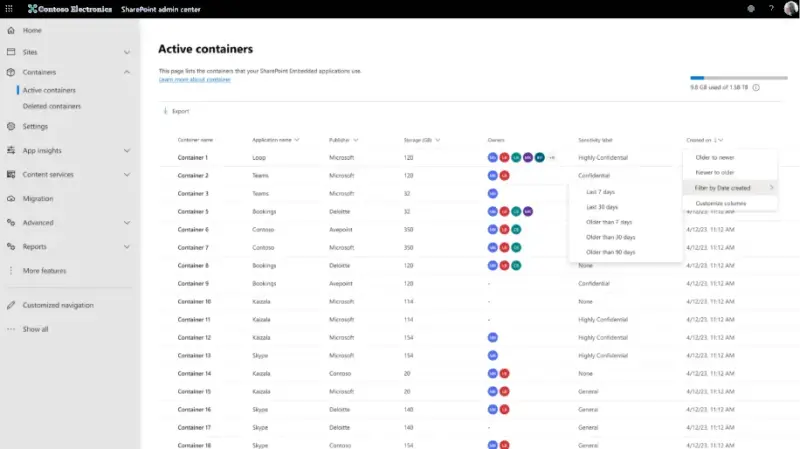
Container administration can also be handled in the SharePoint admin center without PowerShell. SharePoint Embedded and Global admins in the consuming tenant can review active containers, inspect details, manage membership and apply sensitivity labels. They can also archive and reactivate containers, delete them, restore deleted containers or permanently delete them.
These controls bring routine inventory and lifecycle tasks into a graphical admin experience. Archiving and reactivation are in preview. Teams that depend on automation or repeatable reporting can continue to use PowerShell container management; the admin center offers another way to work with the same lifecycle.
Container management guidance describes the admin center controls. For teams planning retention, the key decision is whether content still needs active access and collaboration or can be kept in an archived state.
Archive inactive content and check billing setup
SharePoint Embedded container archival, which is in preview, is intended for containers with outdated or inactive content that must be retained but no longer needs active use. It uses Microsoft 365 Archive, a lower-cost cold-storage tier. Archiving may reduce storage charges compared with keeping the same content in active storage, but actual costs depend on usage, applicable pricing and the organization’s configuration.
Archived content retains the same security, compliance and search standards as active storage, though availability and functionality may differ during preview. Azure billing transactions show an Archived storage meter for storage consumed by archived containers in a tenant. Admins can use the meter when monitoring usage and costs, alongside the organization’s broader billing details. Guidance is available for archiving and restoring containers and for monitoring usage, billing and cost.
For pass-through billing, a Billing or Global admin can connect the Azure subscription and resource group from the Microsoft 365 admin center. This links SharePoint Embedded usage to the consuming organization’s subscription. Apps using pass-through billing need valid billing configured before users can access them, making billing readiness a deployment dependency as well as a cost-management task.
The admin center additions give administrators a common place to coordinate app setup, tenant availability, container lifecycle and payment configuration with development teams. Before a rollout, check the app’s owners and fixed billing type, confirm whether Azure billing is connected, and review which containers remain active. Organizations new to SharePoint Embedded can use the documentation hub to plan architecture, app models, container types, billing, authentication, security and governance before development begins.


