- Subject
- Microsoft 365 & SharePoint
- Filed
- Source
- Rashmi Bhardwaj
- Loans
- 756
API vs CLI: Choosing the Right Interface for IT Automation
CLIs suit direct, hands-on work; APIs give software structured access for repeatable automation and system integration. Choose based on task and scale.
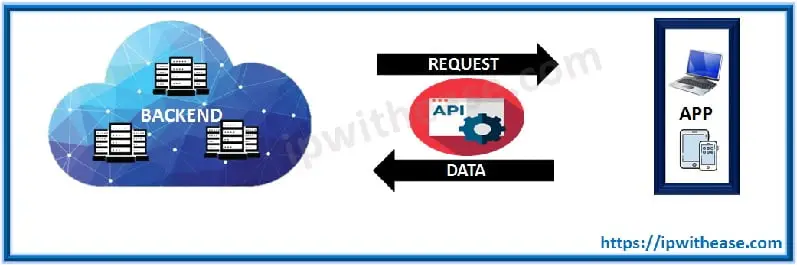
APIs and command-line interfaces can both change settings, retrieve information and create resources. The practical difference is how a person or system makes a request and handles the result. A CLI gives an administrator commands to run directly; an API gives software a defined way to request actions or data from another system.
For a one-off check or an interactive troubleshooting session, a CLI often gets an administrator to an answer quickly. When the same operation needs to run across many devices, feed a monitoring workflow or connect separate applications, an API is usually a better fit. Neither interface is automatically the right choice for every task: the work, scale and available access methods matter.
What an API does
An application programming interface defines how one piece of software can communicate with another. It describes the requests a system accepts and the responses it returns. A mobile app retrieving weather information is one familiar example: the app requests data from a service, which processes the request and sends information back for the app to display.
The same pattern applies to administrative tools. A program might ask a service for device details, submit a configuration change or create a user. The API defines the request structure and the available operations, so the calling program can handle the response as data instead of interpreting a screen designed for a person.
Many APIs use HTTP requests. Methods such as GET, POST, PUT and DELETE indicate the kind of operation being requested, while an endpoint identifies the resource or service involved. Responses often use structured formats such as JSON or XML. This structure helps software distinguish fields and values consistently.
APIs can also control access to software functions or hardware resources. Authentication and permissions determine which requests a user or application can make. Depending on the service, access may use tokens, API keys or OAuth. Administrators should check the available permission scope and credential handling before connecting an API to an automation workflow.
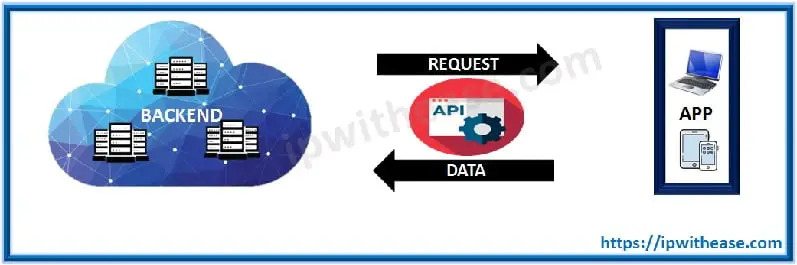
APIs also connect applications. For example, a monitoring system can send information to an IT service management platform so that the receiving software can create or update a ticket. That kind of integration relies on each system exchanging requests and structured responses.
What a CLI does
A command-line interface is a text-based way for a person to interact with a computer, operating system or device. The user enters a command at a prompt, and the system returns output or performs the requested action. That output might be a list, a table, a message or the result of a configuration change.
Network administrators may use a command such as show ip interface brief on a router to inspect interface information. A CLI can also be used to manage files, run software tools or administer cloud resources. Although graphical interfaces are common for everyday device use, the command line remains useful when an administrator needs direct access or wants to combine commands in a script.

CLI access commonly takes place through a login session, such as SSH, or through a console connection. Its output is generally formatted for a person to read. That makes it convenient for an administrator watching a command run, but it can make the output less convenient for another program to interpret reliably.
Where the differences matter
Both interfaces can support similar tasks, such as creating a user, checking device statistics or changing a setting. The difference is how the request is expressed and what happens to the result.
- Who makes the request: A CLI is designed for a person entering commands. An API is designed for software to send requests to another system.
- How the request is written: A CLI accepts text commands at a prompt. An API accepts structured requests, often sent over HTTP to a defined endpoint.
- How results are presented: CLI output is usually arranged for a person to read on screen. API responses commonly use JSON or XML so that software can process individual fields.
- How automation behaves: CLI commands can be included in scripts, but a script that depends on text output may need changes if that output changes between software versions. APIs are designed to provide defined request and response structures, which can make them easier to use in repeatable workflows.
- How quickly an administrator can start: A CLI may be the quicker option for a familiar, isolated task. Using an API typically involves learning its endpoints, authentication method, request format and error responses.
- How access is granted: CLI use often depends on an authenticated login session. APIs may use tokens, keys or OAuth, with permissions set for an application or user. The available controls depend on the service.
- How results reach the operator: A CLI displays output directly after a command runs. An API returns its response to the calling program; an administrator sees it only if that program displays or records the result.
- How systems connect: APIs provide a defined way for applications to exchange requests and data. A CLI is mainly an interface for a person to operate a system, rather than a connection point between applications.
Scale helps determine which approach is practical. Running a command against one device can be straightforward through its CLI. Repeating similar work across many devices or cloud resources may call for an API and a central automation tool. Ansible, Terraform and Python scripts are examples of tools or approaches that can use APIs to carry out repeatable operations.
That doesn't make API automation effortless. The team still needs to understand permissions, handle errors and decide where credentials are stored. A workflow also needs a clear way to report results, since the response may otherwise stay inside the calling program. For CLI scripts, teams should account for differences in command syntax and output between systems or software versions.
Choosing an interface
Use the CLI when an administrator needs to inspect a system interactively, run a familiar command or troubleshoot a specific device. Use an API when software needs to retrieve or change data repeatedly, integrate with another application or manage a larger set of resources through a central workflow.
Some services provide both interfaces, letting administrators use the CLI for hands-on work and the API for application-driven operations. The practical choice is the one that fits the task and gives the team a manageable way to authenticate, process results and recover from errors. Before scaling an operation, check the interface's documented capabilities and test the workflow against the systems it will manage.


