- Subject
- Microsoft 365 & SharePoint
- Filed
- Source
- Tony Redmond
- Loans
- 827
Microsoft Teams Adds Meeting Impersonation Warnings, Transcript Scans and Defender Investigations
Teams is adding identity warnings and automatic transcript checks, while Defender gains call activity records for investigations. Availability and licence requirements vary.
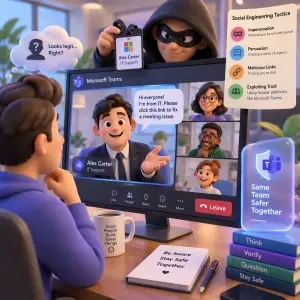
Three layers of protection for Teams calls
Microsoft is adding safeguards at three points in the life of a Teams meeting: before or during a call, while participants discuss information, and afterward when a security team investigates suspicious activity. The changes address impersonation and social engineering, where someone tries to gain trust or persuade an employee to disclose sensitive material.
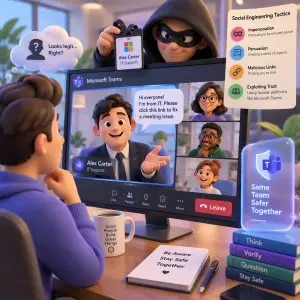
The tools differ in what they inspect and what administrators can control. Impersonation Protection is intended to flag potentially deceptive meeting participants and organizers. The Facilitator agent will scan transcripts for signs that someone is trying to trick participants into sharing sensitive information. Microsoft Defender’s CallActivityEvents data, available now, gives investigators records about Teams call and meeting activity.
For IT teams, the key questions are practical: when each capability arrives, which licences it requires, how it handles false alarms, and what administrators can configure. Microsoft has not provided answers to every one of those questions.
Teams will warn about suspicious identities
Impersonation Protection for Teams meetings is described in message notification MC1530613, dated 29 October 2026, and Microsoft 365 roadmap item 573157. Microsoft expects the rollout to start in mid-December 2026. The feature is designed to detect “potentially deceptive participants and meeting organizers” and highlight the risk to users, who can then decide whether to join or leave the meeting.
That gives meeting attendees a warning at a point when they can still avoid engaging with a suspicious identity. It also puts some responsibility on users: the system surfaces a concern, but the described response is for participants to make a judgment about whether to stay.
False positives are a foreseeable concern. An unfamiliar external participant may have a legitimate reason to attend, such as advising on a project, yet still be flagged. Microsoft has not described the signals Teams will use to assess identities, whether administrators will be able to review those signals, or whether a tenant can disable Impersonation Protection. The required licence is also unspecified.
Organizations that work regularly with external guests will need to watch how the feature behaves in their meeting patterns. A useful warning should help users pause and verify an identity without making routine collaboration feel suspect. Until Microsoft explains the detection criteria and available controls, administrators have limited information for setting expectations with users.
Facilitator will check meeting transcripts automatically
The second change adds a protection skill to the Facilitator agent. Message center notification MC1536056, dated 3 November 2026, and Microsoft 365 roadmap item 573450 describe the feature, which is expected in late January 2027.
Facilitator already uses meeting transcripts to identify information such as summaries and action items. With the new skill, it will also scan transcripts for signs that a participant is trying to trick users into sharing sensitive information. Users do not need to ask the agent to look for social engineering; the check will happen automatically.
Microsoft says the transcript check cannot be disabled for an individual meeting, organizer, or tenant while keeping Facilitator enabled. That makes the feature’s scope a significant administration detail: organizations using Facilitator will have this check applied automatically, based on the description available so far.
If Facilitator detects a problem, users will see a warning with options to end the meeting or temporarily restrict information sharing. The warning could interrupt a legitimate discussion if the agent misreads the context. Microsoft has not defined what it considers sensitive information, explained how it will tune detection, or said whether sensitivity labels will inform the check. Those details will matter to teams deciding how to explain the feature and its alerts to employees.
Using Facilitator requires Microsoft 365 Copilot licences. Organizations should account for that requirement when assessing whether the transcript protection is available to their users.
Defender adds records for post-incident review
The third change supports investigations after a suspicious call or meeting. Message center notification MC1532241, dated 30 October 2026, describes a new use for the CallActivityEvents table in Microsoft Defender XDR advanced hunting. Microsoft says the table is available now and contains information about activities in Teams calls and meetings, including who scheduled calls and what happened.
Those records can help security teams establish how an interaction began and connect activity to the organization associated with its initiator. That context may be useful when investigating suspected impersonation or attempts to persuade employees to disclose information. The capability requires Microsoft Defender for Office 365 Plan 2, included in E5 SKUs.
CallActivityEvents complements the preventive features: the meeting warning and transcript check aim to surface risk during an interaction, while Defender’s activity data can help teams reconstruct events afterward. The source does not specify a retention period or provide example queries, so administrators should consult current Defender documentation for the table’s fields and availability in their environment.
What administrators should track
Teams is a widely used workplace platform, and impersonation gives attackers a way to exploit trust even when account protections make other approaches harder. Microsoft’s three changes address different parts of that problem, but their usefulness will depend on detection quality, clear user guidance, and the controls administrators receive.
Track the mid-December 2026 start for Impersonation Protection and the late-January 2027 timing for Facilitator’s transcript skill. Confirm which users have Microsoft 365 Copilot and Microsoft Defender for Office 365 Plan 2 in E5 SKUs, and review the CallActivityEvents table in Defender XDR advanced hunting if your team investigates Teams incidents. Microsoft’s remaining details on false positives, detection signals, and administrator controls will determine how confidently teams can incorporate the new warnings into meeting procedures.


