- Subject
- Microsoft 365 & SharePoint
- Filed
- Source
- Tony Redmond
- Loans
- 802
Microsoft Graph Adds Read-Only Exchange Custom Attributes for Synced Groups
Graph can read Exchange custom attributes on groups synced from Active Directory, but changes still require Exchange Online cmdlets.
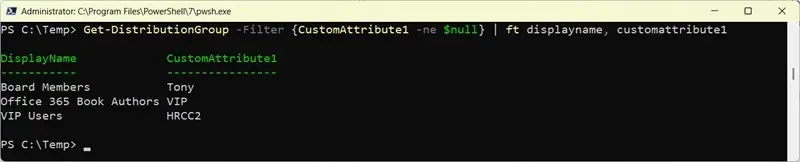
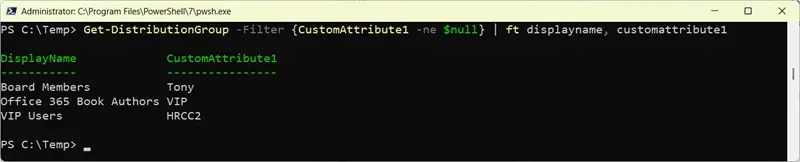
Microsoft Graph now exposes Exchange custom attributes on groups synchronized from on-premises Active Directory, giving administrators another way to inspect group data in Microsoft 365. The capability, introduced in September 2026, is limited: Graph access is read-only, and it covers the fifteen single-value Exchange custom attributes through the onPremisesExtensionAttributes resource.
That makes the feature useful for reporting and queries, but it does not turn Graph into the place to maintain these values. Administrators who need to change an attribute must use Exchange Online cmdlets such as Set-DistributionGroup, assuming writeback is enabled for Entra Cloud Sync. The practical divide is clear: use Graph to retrieve the supported data, and use the Exchange management path to update it.
Which groups are in scope
Microsoft Entra Cloud Sync can synchronize distribution groups and security groups from on-premises Active Directory. Security groups may be mail-enabled or not. Microsoft 365 groups are outside this scope because they cannot be synchronized from Active Directory.
The feature therefore applies to groups that already have an on-premises synchronization relationship. Once those groups are present in Entra ID, administrators can retrieve their properties with the Microsoft Graph PowerShell Get-MgGroup cmdlet. Microsoft’s Cloud Sync group synchronization FAQ describes the group types supported by the service.
For a first pass at finding synchronized groups with a populated value in Exchange custom attribute 1, use an advanced query:
Get-MgGroup -Filter "onPremisesSyncEnabled eq true and onPremisesExtensionAttributes/extensionAttribute1 ne null" -Property Id, onPremisesExtensionAttributes, displayName -ConsistencyLevel Eventual -CountVariable GroupCount
In Exchange, the same field is known as customAttribute1; in the Graph property, it appears as extensionAttribute1. The filter narrows the result to groups marked as synchronized and excludes objects where that attribute is null. The requested properties include the group ID, display name and extension attributes, so the returned objects contain the information needed for inspection.
Entra ID treats this filter as an advanced query. That is why it uses -ConsistencyLevel Eventual. The example also includes -CountVariable, which asks the SDK to retrieve the number of matching objects and store it in a PowerShell variable. That parameter is separate from the consistency-level setting; it is not what makes the query advanced.
Filtering mail-enabled groups
A second query selects synchronized groups that have a mail value and are not Microsoft 365 groups. It requests the extension-attribute property and expands it in the output:
Get-MgGroup -Filter "onPremisesSyncEnabled eq true and mail ne null and NOT groupTypes/any(c:c eq 'Unified')" -Property id, displayName, onPremisesExtensionAttributes -ConsistencyLevel eventual -CountVariable count | Select-Object id -ExpandProperty onPremisesExtensionAttributes
This approach can help administrators review attribute values across eligible mail-enabled groups without retrieving Microsoft 365 groups. The filter checks synchronization status, the presence of a mail value and the absence of the Unified group type. The final selection expands onPremisesExtensionAttributes, making its fields available alongside the group ID.
There is a notable boundary to that output. Graph support does not include the five multi-value custom attributes found on Exchange Online mail-enabled objects. Teams that depend on those fields should not assume they will appear through this group property; the newly supported access is for the fifteen custom attributes described here.
Why Graph access stops at reading
Microsoft has not explained why updates are unavailable. One possible factor is how these values are managed in hybrid environments: an on-premises directory may remain the source of group data, with synchronization making that data available in Microsoft 365. The attributes can also carry information used by business processes, which makes the distinction between viewing a value and changing its authoritative copy significant.
A likely technical constraint is Graph’s limited ability to update group objects that are owned by Exchange. The Update-MgGroup cmdlet cannot update a distribution group. Given that limitation, read access to the custom attributes does not imply that Graph can write them. Updates to the attributes remain tied to Exchange Online cmdlets and the applicable writeback configuration.
For administrators, this affects the shape of automation. A reporting workflow can query the supported values through Graph, while an update workflow needs to use the Exchange management interface. Keeping those responsibilities distinct helps avoid treating a readable Graph property as a writable one.
When to include a count variable
The two parameters in the first query serve different purposes. -ConsistencyLevel Eventual sends the consistency-level header that Graph uses to process an advanced query. -CountVariable requests the count of matching objects and saves the returned value in a PowerShell variable.
Advanced queries do not automatically need a count variable. For example, a query that finds groups whose display names begin with “Office” can use the consistency-level parameter and return the matching groups without collecting a count:
[array]$Groups = Get-MgGroup -Filter "startsWith(DisplayName, 'Office')" -ConsistencyLevel Eventual -CountVariable Count
The count parameter can still be included when it is useful to track the number of results. Some examples use both parameters because they demonstrate count retrieval, but administrators can leave out -CountVariable when they only need the matching objects. The overhead of requesting a count is usually negligible, though there is little reason to request one if the script does not use it.
Read access to these attributes fills a practical gap for teams that inspect synchronized group data with Graph. For now, plan queries around the supported single-value fields, retain Exchange Online cmdlets for changes, and check whether the groups in scope are actually synchronized from Active Directory.


