- Subject
- Microsoft 365 & SharePoint
- Filed
- Source
- Tony Redmond
- Loans
- 345
Teams Meeting Archives Add Copilot Context, Retention and Admin Controls
Teams will create AI meeting archives for Copilot under specific conditions. Admins should review the default five-year retention period and learn how to locate or remove archive files.

Teams meeting archives will give Copilot and Facilitator structured information about past meetings, including decisions, follow-up tasks, summaries and supporting context. For administrators, the main change is a new class of AI-generated files to govern: archive creation depends on meeting settings and licensing, and the default retention period is 1,825 days.

Microsoft described the feature in message center notification MC1429018, last updated 21 September 2026, and Microsoft 365 roadmap item 558933. The rollout schedule puts targeted release in early November 2026, general availability in early December 2026, and worldwide completion in early January 2027. When an AI response draws on an archive, it cites the file like other material. Microsoft’s documentation also refers to other Microsoft AI tools that may use archives, without naming them.
When Teams creates an archive
Meeting archive generation is controlled by Teams meeting policy and is enabled by default. A meeting must have transcription enabled, at least one participant with a Microsoft 365 Copilot licence, and the “Allow Copilot and Facilitator” option set to “During and after the meeting.” A meeting with an encrypted sensitivity label won’t produce an archive. Teams also skips archives for meetings using end-to-end encryption or settings that restrict copying or forwarding.
Administrators can manage the policy in the Teams admin center or with Teams PowerShell module 8.0 or later. This command enables generation for accounts covered by the Global policy and sets archive expiration to 180 days:
Set-CsTeamsMeetingPolicy -Identity Global -AllowMeetingKnowledgeGeneration $True -MeetingKnowledgeExpirationDays 180That setting does not override Microsoft Purview retention policies. Purview policies take precedence, and meeting archive files can be processed by retention policies configured for SharePoint classic and communication sites. The policy’s default 1,825-day period is considerably longer than the 180-day example, so administrators should check which retention rules apply before relying on the Teams setting alone.
PowerShell access and storage
Two cmdlets support archive administration. Get-AIGeneratedKnowledgeContainer returns the URL of the SharePoint Embedded container that holds an archive. Remove-AIGeneratedKnowledge removes an archive file. Both use the meeting’s chat thread identifier as their primary parameter. The archive may take several hours to appear after a meeting ends, depending on server load.
To obtain the identifier, copy the meeting link from its properties and extract the value between /l/chat/ and /conversations. In this example, the thread identifier is 19:meeting_NmNjMGJlODUtMGMyYi00ZTc5LTkyYzMtNmNiOWQxYTMyNDk1@thread.v2. It can then be passed to either cmdlet:
Get-AIGeneratedKnowledgeContainer -ThreadId '19:meeting_NmNjMGJlODUtMGMyYi00ZTc5LTkyYzMtNmNiOWQxYTMyNDk1@thread.v2'The removal cmdlet accepts the same identifier format:
Remove-AIGeneratedKnowledge -ThreadId "19:meeting_NmNjMGJlODUtMGMyYi00ZTc5LTkyYzMtNmNiOWQxYTMyNDk1@thread.v2"There is a practical caveat: the cmdlet has been observed to report success even when given an arbitrary value, so its success message alone may not confirm that the intended archive was removed. Verify the result through an appropriate administrative process before treating removal as complete.
Teams distributes meeting archive files across 200 SharePoint Embedded containers. The returned URL identifies the relevant container, and administrators can inspect container details with Get-SPOContainer from the SharePoint Online management module. That inspection can help identify the container named “Meeting Artifacts” and check its site URL and storage information.
Direct access to items in SharePoint Embedded containers is limited by the Graph fileStorageContainer API to the application that owns the container. For meeting archives, that application is Teams. The Graph API documentation describes this access boundary, which means administrators should not expect to browse archive files as ordinary SharePoint content.
Finding and reviewing archive contents
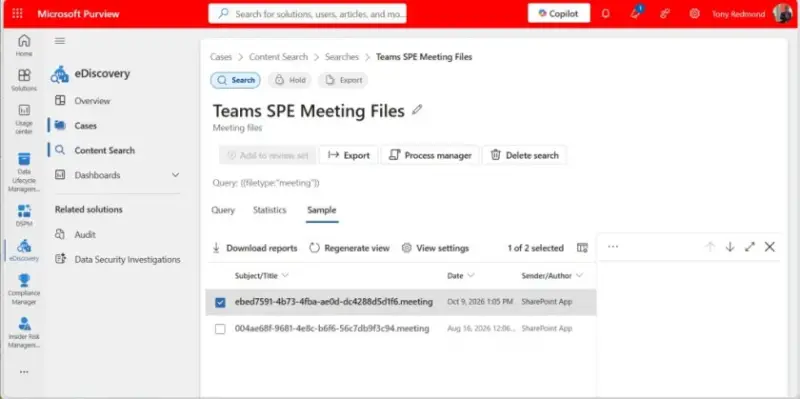
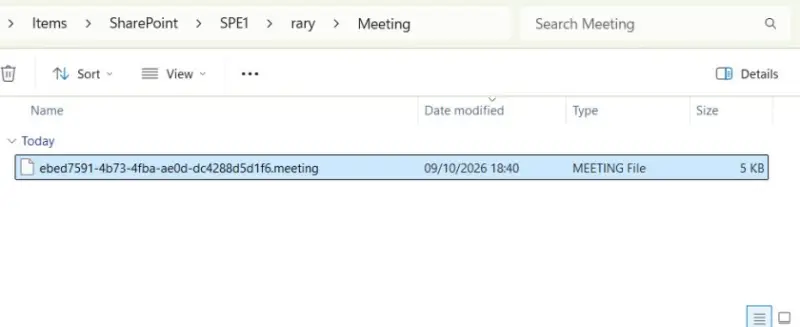
Purview eDiscovery can find and export meeting archives even though direct access is restricted. Create a content search with SharePoint Online sites as the source and use the query Filetype:"meeting". eDiscovery preview cannot display the archive contents, but an export packages matching files and summary information in a ZIP file.
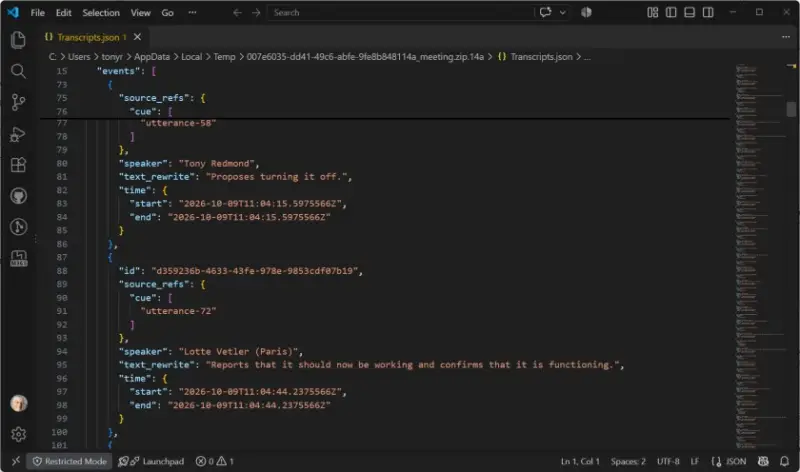
The files are compressed but not encrypted. Microsoft describes them as AI-generated information intended to help Copilot understand earlier meetings and add context to later conversations. A file can include decisions, assigned actions and follow-ups, summaries, and supporting context. Its transcripts.json file stores the structured information, including captured participant remarks.
The archive is designed to help Copilot and Facilitator retrieve meeting context. Access to those insights is limited to meeting participants, and Copilot can use an archive only for users in the same tenant as the meeting organizer. Administrators should account for those limits alongside the retention period when setting expectations for users.
Review retention before rollout
Meeting archives add persistent content to the tenant’s data lifecycle. Before rollout reaches users, admins should review the 1,825-day default, applicable Purview retention policies, and the conditions that prevent archive generation. A shorter Teams expiration value may better match how long the organization needs these meeting insights, but the effective retention outcome depends on the Purview policies that apply.
Also document how administrators will locate and remove an archive, bearing in mind the cmdlet’s reported success behavior and the delay before files become available. These checks will help teams understand what Copilot can draw from past meetings and how long that context remains stored.


