- Subject
- Microsoft 365 & SharePoint
- Filed
- Source
- Tony Redmond
- Loans
- 643
Microsoft Graph PowerShell SDK: When to Use Each Group Member Cmdlet
Both cmdlets add members to static Entra ID groups, but New-MgGroupMember needs less setup. Use the ByRef cmdlet when working with the Graph reference endpoint.
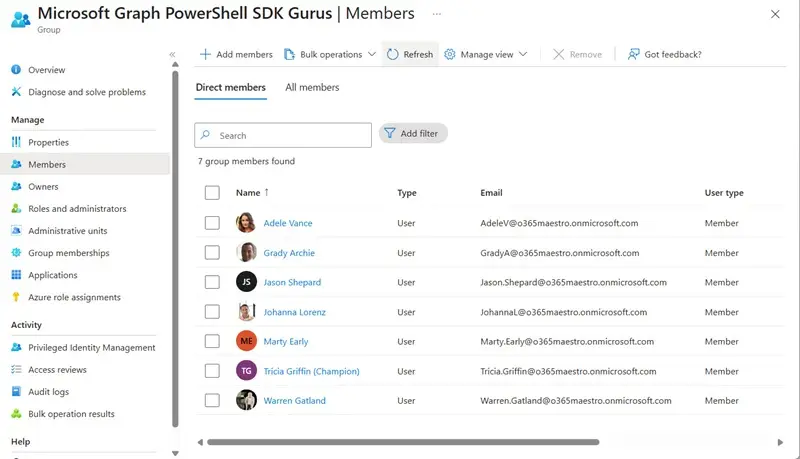
For routine Entra ID group administration, New-MgGroupMember is usually the simpler choice. The Microsoft Graph PowerShell SDK also provides New-MgGroupMemberByRef, which adds a member through a Graph relationship endpoint. Both can produce the same membership change, but the different names reflect how the SDK is generated from Graph metadata.
Why the SDK has two add cmdlets
The distinction comes from two Graph operations for group membership. One updates the group’s members navigation property; the SDK exposes that operation as New-MgGroupMember. The other manages a reference through the members $ref endpoint and appears in PowerShell as New-MgGroupMemberByRef. The Graph SDK build process maps those separate operations to separate cmdlets, even though both add a member.
The same pattern applies to group owners: the SDK has both New-MgGroupOwner and New-MgGroupOwnerByRef. These pairs are a consequence of the API surface, rather than a sign that administrators need to perform two different membership tasks.
For groups with static membership managed in the cloud, either add cmdlet can establish the relationship. Dynamic group membership works differently: its members are determined by the group’s membership rule, so administrators change that rule to affect membership rather than adding an individual member with either cmdlet.
Use the convenience cmdlet for a direct add
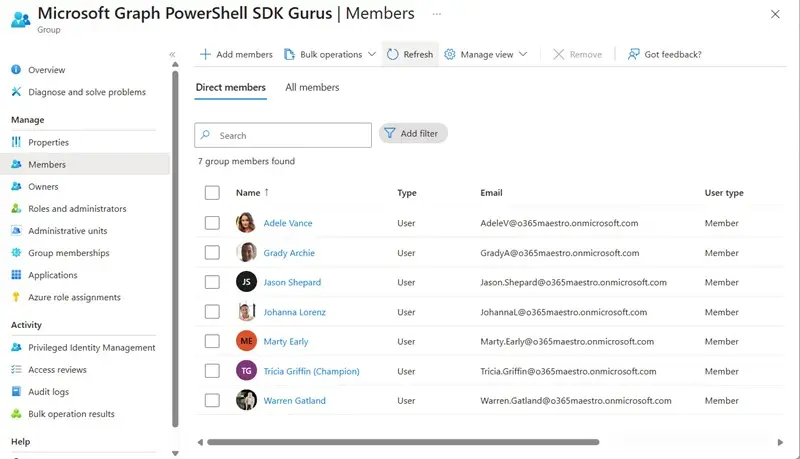
New-MgGroupMember takes the group identifier and the directory object identifier of the member. The example below finds Adele Vance and the target group by display name, selects their object IDs, then passes those IDs to the add cmdlet:
$UserId = Get-MgUser -Filter "displayName eq 'Adele Vance'" | Select-Object -ExpandProperty Id
$GroupId = Get-MgGroup -Filter "displayname eq 'Microsoft Graph PowerShell SDK Gurus'" | Select-Object -ExpandProperty Id
New-MgGroupMember -GroupId $GroupId -DirectoryObjectId $UserId
The important input is the member’s object ID. A user principal name or another account label is not a substitute for that identifier in this command. In an administrative workflow, the lookup and add steps therefore depend on obtaining the correct object and passing its ID to the group operation.
This cmdlet is often described as a convenience cmdlet because it handles the input shape needed for the Graph operation. For a straightforward add, that means less request setup in the script. The Graph documentation uses New-MgGroupMemberByRef in its example for adding a member, but that does not make the reference-based cmdlet the preferred PowerShell option. The simpler cmdlet is a practical default when it meets the task.
What the ByRef version requires
The reference-based cmdlet requires a request body containing an @odata.id value. That value points to the directory object being added. The example builds the reference from the same user ID and then supplies the resulting body to the cmdlet:
$MemberRef = ("https://graph.microsoft.com/v1.0/directoryObjects/{0}" -f $UserId)
$MemberInfo = @{}
$MemberInfo.Add("@odata.id", $MemberRef)
The body has this shape:
$MemberInfo
Name Value
---- -----
@odata.id https://graph.microsoft.com/v1.0/directoryObjects/8cc6726c-dee2-4059-9bde-44e3173af025
Pass it with the group ID to create the membership reference:
New-MgGroupMemberByRef -GroupId $GroupId -BodyParameter $MemberInfo
That additional construction is useful to understand when a script or workflow is built around the Graph reference operation. For ordinary PowerShell administration, it adds work that New-MgGroupMember can avoid. The two approaches still rely on identifying the intended directory object and target group correctly.
Group type also affects which objects can be members. Microsoft 365 Groups accept user accounts, including guests. Security groups can also contain other groups, devices and service principals. In each supported case, the directory object identifier tells Graph which object to add.
Removal uses the reference cmdlet
The SDK does not provide a matching Remove-MgGroupMember cmdlet. Graph removes a group member through the $ref relationship endpoint, so the available removal command is Remove-MgGroupMemberByRef. Owners follow the same pattern: use Remove-MgGroupOwnerByRef to remove an owner.
This difference matters when building scripts that add and remove membership. The add path can use the simpler cmdlet, while removal uses the reference-based form. Administrators should account for that asymmetry when reading examples or standardizing scripts across membership operations.
Keep Exchange-managed groups separate
Neither add cmdlet is for distribution groups or mail-enabled security groups. Exchange Online controls those objects, so membership changes need to use Exchange cmdlets such as Add-DistributionGroupMember. A script should account for the group’s type before choosing a Graph operation; using the Graph group member cmdlets for an Exchange-managed group is the wrong route.
Documentation and practical checks
A documentation issue for the Microsoft Graph PowerShell SDK reported that New-MgGroupMember lacked an example. A pull request was submitted to add a simple usage example. The SDK documentation is generated from its source and Graph metadata, so its contribution process differs from editing a typical Microsoft Learn article. The SDK is hosted in a public repository where external contributors can propose documentation changes; acceptance of the submitted pull request was still unresolved.
For administrators, the useful working rule is straightforward: identify whether the target is an Entra ID group with static membership, confirm the intended member’s object ID, and use New-MgGroupMember for the direct add when appropriate. Use the ByRef form when the reference endpoint is specifically needed, use the ByRef removal cmdlet for removals, and route Exchange-managed groups through Exchange cmdlets.


