- Subject
- Microsoft 365 & SharePoint
- Filed
- Source
- Lucas Magnum
- Loans
- 604
Veeam Backup Merge Fails Despite Free Space: Rescan the Repository
Veeam backup merges failed despite available repository capacity. A repository rescan refreshed its information, and the jobs then completed successfully.
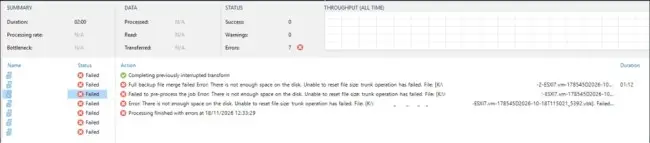
Veeam Backup & Replication can report insufficient disk space during a backup file merge even when the repository appears to have room. In one VMware vSphere environment, several jobs failed with that message, but checks of the storage showed free capacity. The team rescanned the affected repositories, which refreshed Veeam’s repository information, and the jobs completed successfully when rerun. That’s a useful troubleshooting result, though it doesn’t prove the rescan was the underlying fix: the evidence shows what happened in this environment, not a universal remedy.
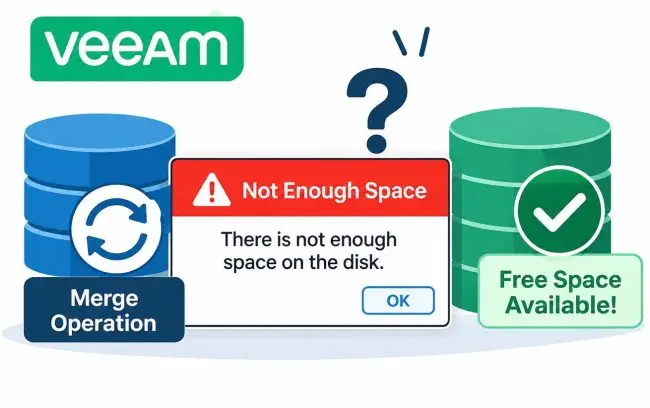
What failed during the merge
The affected jobs reported three errors:
Full backup file merge failed
There is not enough space on the disk
Unable to reset file size: trunk operation has failed
The failure occurred during a merge operation in the backup chain. Merge operations consolidate data between existing restore points as part of backup file maintenance, so this kind of failure can interrupt a job even if no new backup file has yet filled the repository. The message points to a problem writing or resizing a file, but it doesn’t by itself identify whether the cause is capacity, a file system restriction, a quota, or another write constraint. That distinction matters: treating the error text as a definitive diagnosis can send an administrator looking at the wrong layer.

The team checked the storage before making changes and found no apparent shortage of physical capacity on the disk used by the jobs. That’s a useful first check, but a display of free space is only one part of the picture. Administrators also need to establish which repository and extent the job is using, whether the relevant path can accept the write, and whether the merge has enough working space under the conditions in which it runs. A broad capacity view can look reassuring while leaving those details unresolved.



That finding shifted the investigation from raw capacity to the information Veeam had about the repository and the conditions affecting file writes. Veeam KB1827 describes cases where the same disk space message can involve file system limits, storage quotas, or other restrictions on writing files. Merge operations also have free space requirements, so a capacity check alone may not explain every failure. Here’s the thing: a repository can have free capacity in aggregate while the specific operation still encounters a limit or constraint on the path it needs to use.
Rescan the repository information
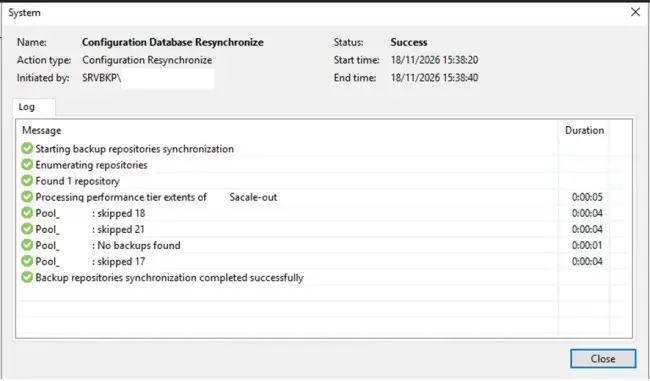
After the initial storage checks, the team rescanned the repositories from the Veeam console. A rescan is a low effort diagnostic step when the console’s view of repository contents or capacity may be stale, particularly in environments where repositories have multiple components. It refreshes Veeam’s recorded information; it doesn’t expand storage or alter the underlying files. The procedure used was:

- Open the Veeam Backup & Replication console.
- Go to Backup Infrastructure, then select Backup Repositories.
- Find the repository used by the failed jobs.
- Right-click the repository and select Rescan.
- Wait for the rescan to finish, then rerun the affected jobs.
After the rescan completed, the team reran the jobs and processing succeeded without the insufficient space error. The observed result points to stale or out-of-date repository information as a possible factor in this incident; it doesn’t establish that a rescan will resolve every merge failure with the same message. That’s the limit of the evidence. A successful rerun tells the team the immediate job could proceed after the refresh, but it doesn’t isolate which repository detail, if any, had been out of date.
What a rescan updates, and what it can’t fix
A repository rescan refreshes Veeam’s information about existing backups. For a Scale-Out Backup Repository (SOBR), it also refreshes information about extents, Data Mover status, and available capacity. That can help when a repository has multiple components, files have moved, or the storage infrastructure has changed. In a setup with several extents, an up-to-date view can help administrators understand where Veeam believes backup data resides and what capacity it has recorded.
A rescan doesn’t add physical capacity, remove a file system limit, or change a storage quota. If the job continues to fail, the available space and write constraints still need investigation. Teams should also account for the free space required by the merge operation itself, rather than relying only on a general view of total repository capacity. Similar systems often expose several different views of storage state, and those views may describe different things: total pool capacity, free space on a path, or space available to a particular operation.
For administrators, the practical sequence is to check the repository’s actual storage and relevant write restrictions, then consider a rescan when Veeam’s recorded repository information may be out of date. If the error persists afterward, continue troubleshooting the conditions that can prevent file writes; deleting backup files or changing retention settings shouldn’t be the first response to a message that may not reflect a full disk. If you’re working in this space, record which repository was rescanned and whether the same jobs then completed. That gives the next person a useful incident trail, even if the initial cause remains uncertain.
Why the distinction matters for operations
This is more significant than it looks because backup maintenance failures can be easy to misread as a simple capacity problem. A team that reacts by freeing space without first checking the write path may spend time changing storage or retention arrangements without addressing the condition that caused the error. And yet, a rescan’s success shouldn’t become a reason to stop checking: if the message returns, the underlying constraint may still be present.
(And this is the part most people overlook.) A successful job after a rescan is an operational outcome, not a root cause analysis. The useful lesson is to treat the error as a starting point: confirm the storage available to the affected repository, check applicable limits, refresh Veeam’s view when it may be stale, and then assess the next job result. Sometimes the refresh is enough. Sometimes it only makes the next diagnostic step clearer.
References: Veeam KB1827: There Is Not Enough Space on the Disk; Rescanning backup repositories; Rescanning Scale-Out Backup Repositories; Backup file placement for the Performance Tier.