- Subject
- Networking
- Filed
- Source
- Rashmi Bhardwaj
- Loans
- 391
Cisco ACLs for Blocking Spoofed IP Traffic at Network Boundaries
Cisco ACL examples show how to filter private, reserved and unauthorized source addresses at network interfaces, with key checks before deployment.
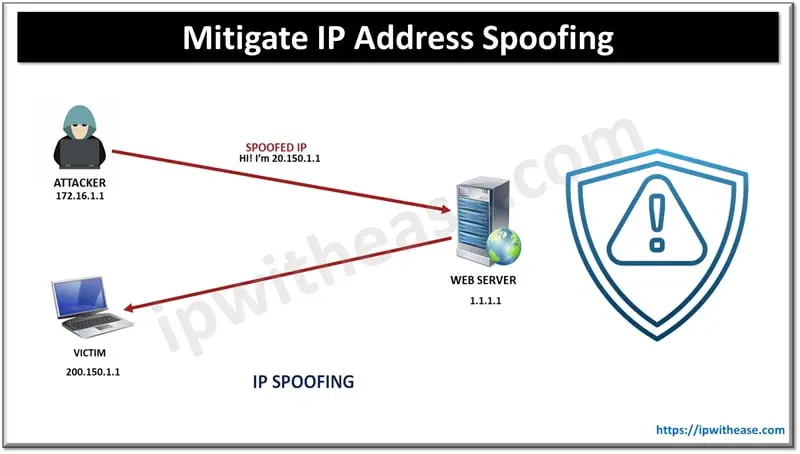
Source address filtering at a router can stop packets that claim to come from address ranges that should never arrive on a particular interface. The Cisco access control list (ACL) examples below apply that idea to an Internet-facing interface and to traffic leaving an internal network. They’re a starting point for a network-specific policy: the interface direction, permitted destinations and address ranges must match the actual design.
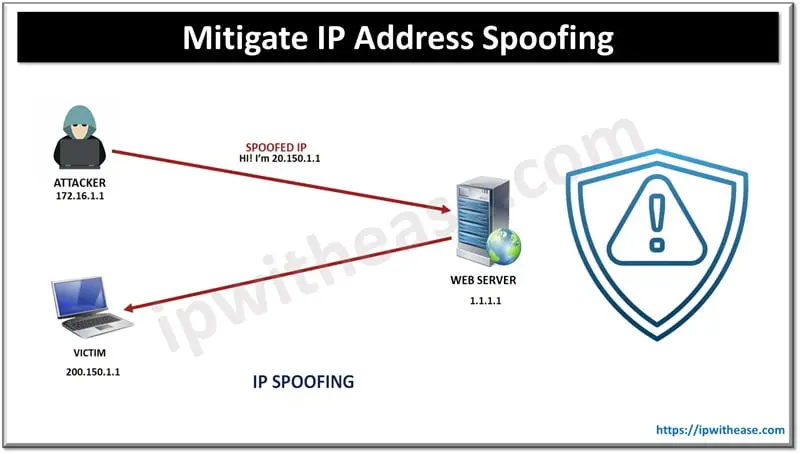
IP address spoofing occurs when a sender alters packet headers to make traffic appear to come from a different address. The technique can help conceal a sender’s origin or support attacks such as denial of service and session hijacking. A spoofed source address is a warning sign and a means of disguising traffic; filtering it at the network edge can reduce exposure, but it does not address every attack method.
Filter addresses that should not arrive from the Internet
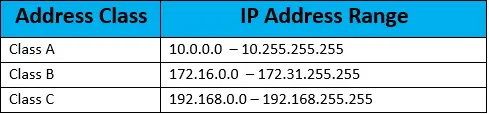
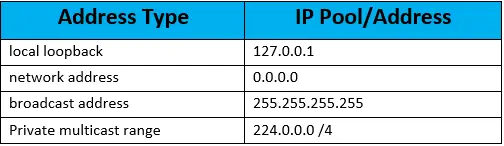
The first ACL denies RFC 1918 private address ranges when they arrive from outside: 10.0.0.0/8, 172.16.0.0/12 and 192.168.0.0/16. Those ranges are intended for private networks and generally should not be presented as source addresses on traffic arriving from the public Internet. The examples also deny loopback addresses, the 0.0.0.0/8 range, multicast addresses and the limited broadcast address.
Each deny line uses the log option, which requests logging for matching traffic. That can help administrators review what the filter is seeing, though teams should account for their router’s logging capacity and monitoring setup. A high volume of matching packets may produce substantial log activity.
Inbound ACL example
In the example, ACL 101 denies the listed source ranges and then permits IP traffic destined for 192.168.5.0/24. The commands apply that list inbound on interface Gi0/0, identified as the Internet-facing interface.
R1(config)# access-list 101 deny ip 10.0.0.0 0.255.255.255 any log
R1(config)# access-list 101 deny ip 172.16.0.0 0.15.255.255 any log
R1(config)# access-list 101 deny ip 192.168.0.0 0.0.255.255 any log
R1(config)# access-list 101 deny ip 127.0.0.0 0.255.255.255 any log
R1(config)# access-list 101 deny ip 0.0.0.0 0.255.255.255 any log
R1(config)# access-list 101 deny ip 224.0.0.0 15.255.255.255 any log
R1(config)# access-list 101 deny ip host 255.255.255.255 any log
R1(config)# access-list 101 permit ip any 192.168.5.0 0.0.0.255
R1(config)# interface Gi0/0
R1(config-if)# ip access-group 101 in
That final permit is specific: it allows traffic to the stated /24 destination network. Cisco ACLs also have an implicit deny at the end, so traffic that does not match a permit is dropped. Administrators should confirm that this destination-based rule covers the intended inbound services and that required traffic to other destinations has an explicit permit. As written, this is not a universal Internet-edge policy.
Restrict traffic leaving the internal network
Filtering only incoming traffic leaves another question: can internal hosts send packets with source addresses outside the organization’s assigned range? The second example permits traffic sourced from 192.168.5.0/24 and denies other IP traffic. It applies ACL 110 inbound on Gi0/1, described as the secured interface.
R1(config)# access-list 110 permit ip 192.168.5.0 0.0.0.255 any
R1(config)# access-list 110 deny ip any any log
R1(config)# interface Gi0/1
R1(config-if)# ip access-group 110 in
Direction matters here. The command ip access-group 110 in filters packets as they enter Gi0/1. For this to check traffic from internal hosts, Gi0/1 must be the interface through which that traffic enters the router. Interface names and labels vary by deployment, so verify the topology before applying the list. The permit also assumes 192.168.5.0/24 is the only legitimate source range on that interface; environments with additional subnets need rules that account for them.
Checks before applying the rules
Review the ACL against legitimate traffic flows, including any additional internal networks, routing arrangements and services that must remain reachable. Confirm the router’s interface roles and the intended direction of filtering. Then inspect the resulting ACL and its match counts, and check logs for denied packets. These steps help catch a rule that blocks valid traffic or fails to see the traffic path it was meant to filter.
Ingress filtering and ACLs can make address spoofing harder at network boundaries, but they do not prove that every permitted packet is authentic. The examples provide source-address controls for the ranges shown; cryptographic mechanisms such as IPsec can add integrity and peer authentication where the network design supports them. For administrators, the practical takeaway is to map valid source ranges to each interface, apply filters in the correct direction and watch for unexpected drops after deployment.