- Subject
- Windows & PowerShell
- Filed
- Source
- IPWITHEASE
- Loans
- 708
Network Firmware Patching: Build an Inventory, Set Tiers and Plan Rollbacks
Edge device breaches are rising, while firmware reloads make patching harder. A tiered schedule and tested rollback plan can make updates manageable.
Network firmware patching tends to slip because it carries an immediate operational cost: a firewall or core switch may have to reload, taking services offline. But internet facing devices are also a growing route into company networks, and many lack the monitoring and automatic patching teams rely on for laptops. The practical response is a schedule that accounts for exposure, outage impact and recovery.
Why edge devices need a faster patch cycle
Verizon’s 2025 Data Breach Investigations Report found that edge devices or VPN appliances accounted for 22% of breaches that began with exploitation, compared with 3% in its 2024 report. Verizon described that as an almost eight-fold increase. Exploitation itself also became more common, rising 34% to about a fifth of breaches. Taken together, edge devices and VPNs were involved in roughly 4–5% of all breaches in the 2025 data.
In the 2026 report, exploitation started 31% of breaches and overtook stolen credentials as the most common initial route. Verizon also reported credentials somewhere in 39% of breaches, reflecting a different measure. These figures point to a sustained patching challenge for infrastructure at the network edge, even though the report’s categories do not describe identical ways into an organization.
The 2025 reporting period covered November 2023 through October 2024. During that span, attackers exploited flaws affecting products from several vendors: Citrix NetScaler’s “Citrix Bleed” in late 2023; Ivanti Connect Secure VPN in January 2024; Fortinet FortiOS SSL VPN in February; Palo Alto GlobalProtect, CVE-2024-3400, in April; Cisco ASA firewalls in the “ArcaneDoor” campaign, also in April; and Check Point VPN gateways in May. Some were zero-days, meaning attackers used the vulnerabilities before patches were available.
Internet facing appliances present a different patching problem from managed laptops. They can be visible to internet scanning, may not support a conventional endpoint detection agent, and often have thinner logs. A flaw can affect many similar devices, while VPN sessions, credentials and access to internal systems make a compromised appliance consequential.
Updating firmware can require a reload. During that restart, VPN connections drop and services behind a firewall or core switch may be interrupted. Redundant hardware can reduce the impact, but without it, administrators often need a maintenance window and a recovery plan. Verizon found that only 54% of edge device vulnerabilities were fully remediated during the year, with a median remediation time of 32 days. Access to vendor downloads can also depend on support arrangements; the source describes Cisco customers without a service contract asking TAC for a free security upgrade with the device serial number and advisory link.
Build an inventory from the devices
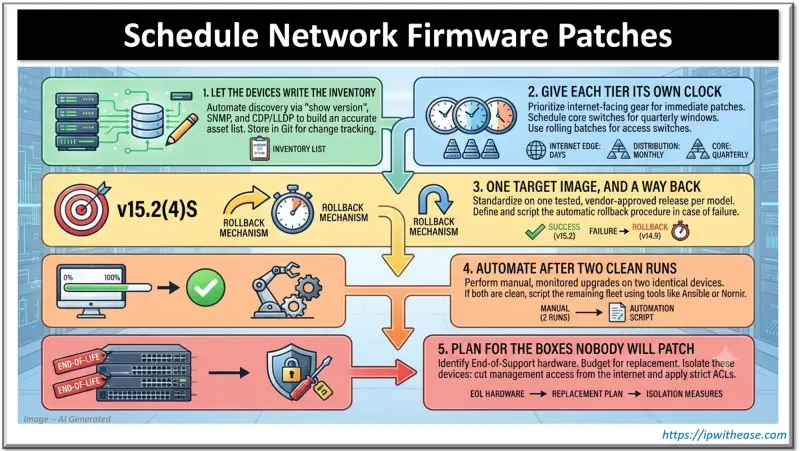
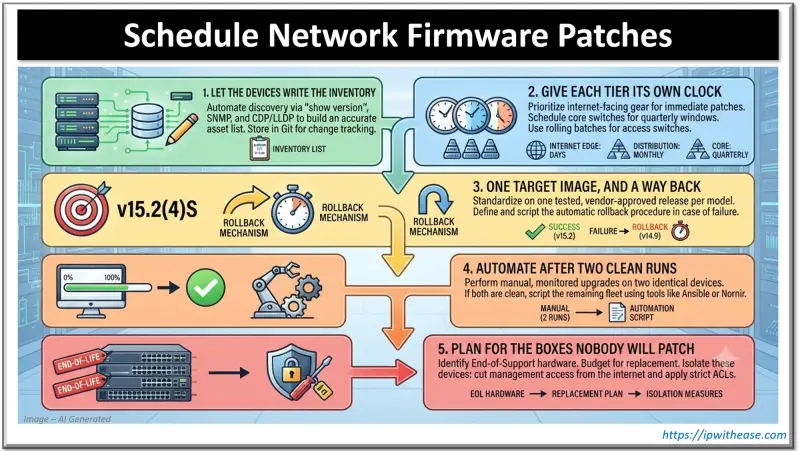
Start with a current record of models, running firmware, location, exposure and ownership. A spreadsheet depends on someone keeping it fresh. Network devices can supply much of the data: on Cisco equipment, show version reports the model and running image; SNMP can collect equivalent details across devices through sysDescr and ENTITY-MIB. Use show cdp neighbors detail, or LLDP on mixed networks, to identify connected equipment and uncover devices that might otherwise be missed.
Store the collected inventory in Git and review a nightly diff to see what changed. Add an owner for each device and a clear indication of whether it can be reached from the internet. Then compare installed versions with vendor advisories and CISA’s Known Exploited Vulnerabilities catalog.
That inventory also makes urgent searches faster. In September 2025, after attackers chained CVE-2025-20333 and CVE-2025-20362 on Cisco ASA, CISA’s Emergency Directive 25-03 gave US federal agencies about a day to find ASA and Firepower devices. A device generated inventory can turn that kind of identification task into a targeted search.
Set patch timing by exposure and outage impact
Sort devices by two questions: who can reach them, and how much of the network goes down if they reboot? Internet facing systems belong at the front of the queue, with out of cycle updates when a fix becomes available or a vulnerability appears in KEV. Palo Alto’s CVE-2024-3400 affecting GlobalProtect, rated CVSS 10, was exploited in April 2024 before a hotfix existed.
Sometimes a temporary configuration change can reduce exposure while a firmware fix is pending. For CVE-2023-20198, which allowed attackers to create administrator accounts through the Cisco IOS XE web UI, Cisco’s first advice in October 2023 was to disable the HTTP server. The commands provided were:
show running-config | include ip http server|secure|active
configure terminal
no ip http server
no ip http secure-server
Core switches generally warrant planned maintenance because their reloads affect many users, along with a documented rollback. Access switches can be updated in rolling batches, timed around the needs of each floor. A starting cadence described here is days for internet facing gear, a quarterly window for the core and monthly batches for access switches; teams should adjust it to their topology and exposure.
Choose a target image and verify recovery
Select one target release per model. Cisco marks a suggested release with a gold star on its download page, which provides a more considered default than simply choosing the newest build. Read the release notes, paying attention to changed defaults. For example, dropping an older SSH algorithm could prevent a backup tool from connecting.
For Catalyst 9000 switches running in install mode, the example workflow saves the running configuration, checks the image hash, activates the image with a timed rollback, verifies service and then commits:
copy running-config tftp://10.0.0.5/sw-access-01.cfg
verify /md5 flash:cat9k_iosxe.<version>.SPA.bin
! match the hash on Cisco's download page
install add file flash:cat9k_iosxe.<version>.SPA.bin
install activate auto-abort-timer 120
! the switch reloads; log back in and run the checks
install commit
The 120-minute auto-abort timer gives an administrator time to check the switch after it reloads. If install commit isn’t run before the timer expires, the switch automatically returns to the previous image. Before committing, compare show ip ospf neighbor, show ip bgp summary and show interfaces status with saved pre-upgrade output. After a successful update, install remove inactive removes old files. Other platforms use different rollback methods, so confirm the vendor’s procedure for each device family.
Automate only after manual runs succeed
Run the procedure manually on two switches of the same model before scripting it. If both upgrades complete cleanly, teams can automate with the Ansible cisco.ios collection, or use Nornir and Netmiko where Python is part of the workflow. Automation repeats errors as reliably as it repeats correct steps, so test the sequence before applying it widely. Meraki and Mist can stage and schedule firmware through their controllers.
MSPs should check what their RMM platform supports for network equipment, including SNMP monitoring, configuration backups and switch scripts. Coverage varies, so confirm those capabilities before building a separate patch workflow.
Set an end of support plan
Some devices stop receiving security fixes. Cisco’s end of life bulletins specify an “End of Vulnerability/Security Support” date. Record that deadline alongside the device owner and plan replacement before support ends. Until replacement, reduce exposure where possible by removing internet access to management interfaces and applying access lists to services that must remain reachable.
A workable patch program ties each device to an owner, a target image, a maintenance window and a tested recovery path. Keep the inventory current and let exposure determine urgency; then firmware updates become scheduled operational work instead of a task repeatedly deferred to the next quiet weekend.


